Skip to main content Announcing Tool Gateway MCP: the universal MCPRead the announcement

Tool Gateway MCP

Connect AI platforms to all business systems, securely.

One universal MCP Gateway, one URL. Every employee’s AI reaches your systems under their own permissions, within limits IT set.

MCP server URL https://mcp.stackone.com/mcp

An employee asks their AI assistant — Claude, ChatGPT, M365 Copilot, Glean, Gemini Enterprise or any of 60+ clients. The assistant reaches the StackOne Tool Gateway MCP over one URL. Above the gateway, the IT team picks which connectors, actions and field rules it allows before anyone connects. The gateway then calls the business systems behind it, 32,000+ actions across 520+ apps.

Connect
One URL gives every AI client the same 32,000+ actions across 520+ business apps.

What is blocking AI rollouts from going wall to wall

The answer

StackOne’s Tool Gateway MCP is the single middleware that connects your agent to all your business systems, securely and efficiently.

Reach

Every system is another build, and it starts over for each assistant

A pilot touches three systems. A rollout touches all of them, and each one is something you ship and then keep alive. Then one team picks a different assistant and you do it all again.

Connect

One connection, every assistant

Connect StackOne once and every AI assistant in the company is served. No build per app, and nothing to redo when a team switches assistant.

How connection works

Control

The log says a service account did it

Once everyone is connected, assistants write to your systems of record all day. The log shows the server ran a tool, with no name behind it and no assistant it came from, and nothing stops the next one.

Secure

See and control every action

You can see what every assistant is doing in your business systems. Each call runs under that person’s own permissions, and nobody has to wait for it.

How governance works

Cost

Two systems in, and the assistant is out of room

Most assistants take about 100 tools from one server. List your actions directly and two systems use up the lot, so the third never loads. What did load costs tokens on every call and makes the model worse at picking the right one.

Optimize

A short tool list, however much you connect

Most MCP servers push the whole tool catalogue into the context window. Token bills climb and the model reasons worse. StackOne sends two tools and fetches the rest when a task needs them.

How Tool Discovery works

Companies already connected through StackOne

Connect

One URL to connect all AI platforms to your internal systems.

  • One connection serves every AI assistant you run
  • No MCP server to deploy per application
  • Employees manage their own credentials
Without pre-built connectors? You build and version each integration yourself: auth, pagination, field mapping, and every breaking change the vendor ships.

Pre-built and custom connectors

520+ connectors and 32,000+ actions, built and maintained for CRM, ERP, HR, finance, IT and knowledge tools. Anything the catalogue does not cover, the Connector Builder adds.

Without universal client support? Each assistant needs its own bridge, and they do not register the same way: dynamically, as a static client, or by metadata document. That is one build and one maintenance job per client.

One URL, every client

One URL, and it is the same one for every customer and every client. Adding it to an assistant is pasting a link, and StackOne supports all three ways clients register, so there is nothing to build per client.

IT sets up Tool Gateway MCP once. Everyone else self-serves within guardrails.

Step 1IT admin · once per assistant

IT connects once

Pick which connectors and actions each group can use, then paste the Tool Gateway MCP URL into your AI client. One URL covers every assistant.

Step 2Employee · self-serve

Employees authorise themselves

Each person signs in from the chat window they already have open, and authorises their own accounts through each system’s own login.

Step 3Every day after that

Then they just ask

Actions run under that person’s own permissions. Every call is logged in StackOne with the assistant it came from and the person behind it.

60% of AI deployments fail because of integrations

Read why Connect matters

Secure

Govern, secure, and observe in one place.

  • Reads auto-approved, writes and deletes held for sign-off
  • Tokens handled by StackOne, never by the assistant
  • Every call records the assistant and the verified user
Without attribution? The log says the server executed a tool. It cannot tell you who asked for it, or which assistant they asked from.

Attributed audit logs

Every call records the assistant it came from and the verified user who ran it, not a shared service account, so one view covers every person across every assistant your team uses.

Without granular permissions? The agent inherits everything the person can do, and every field the API returns reaches the model.
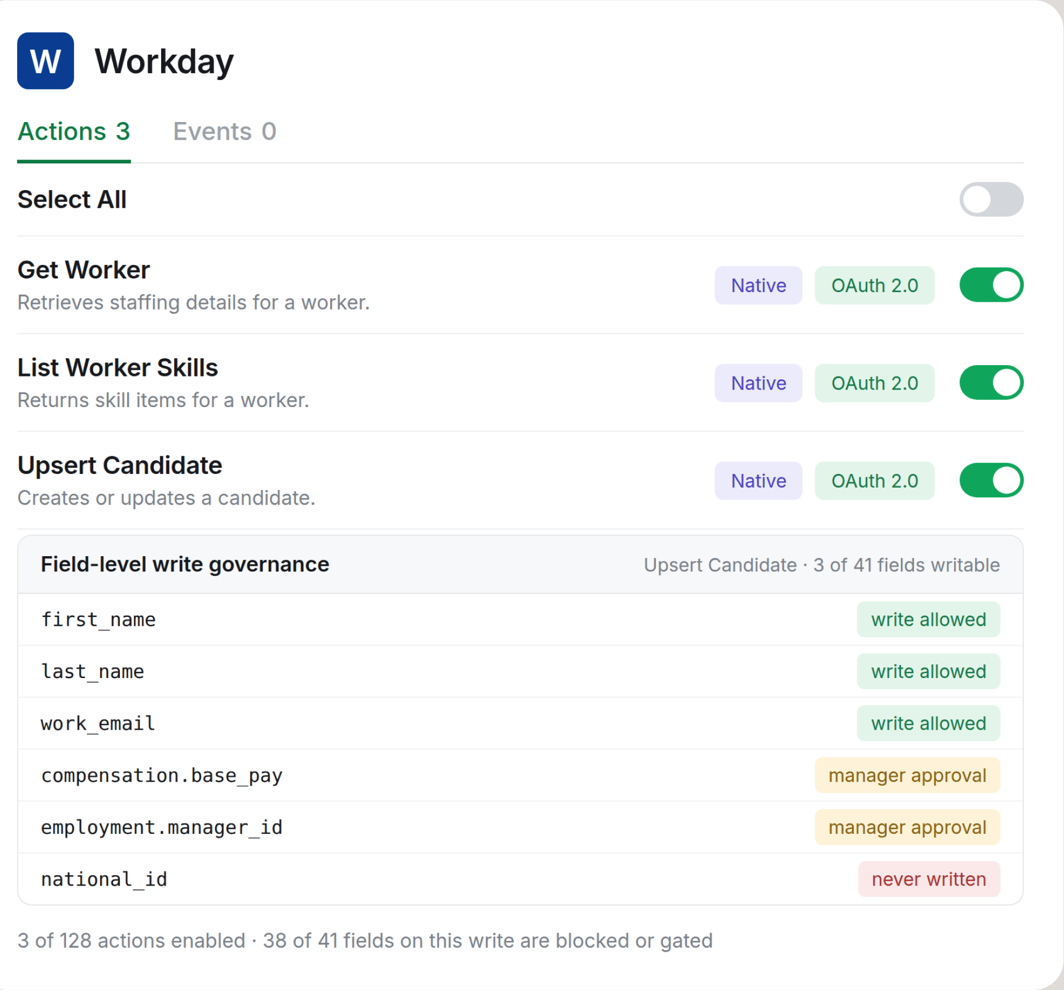
StackOne connector profile for Workday: three of 128 actions enabled, and on the Upsert Candidate write, first_name, last_name and work_email are allowed, compensation and manager id need approval, national id is never written.

Field-level write governance

Turn on three of 128 actions, then decide field by field what a write may touch. Names and work email allowed, compensation and manager held for approval, national id never written.

MCP Annotations

Every action is tagged read-only or write, so the assistant approves reads on its own and holds writes and deletes for a person to sign off.

StackOne-managed OAuth

StackOne stores and refreshes the OAuth tokens. The assistant never sees a credential.

Personal or shared accounts

Personal credentials keep an assistant inside one employee's permissions. Shared credentials reach team and company tools, still under IT control.

An Ungoverned Agent Is a Liability: 10 prompt injection examples

Read why Secure matters

Optimize

Save tokens by processing data outside of the context window.

  • Two discovery tools in context, not thousands of parameters
  • Parameter schemas fetched only when a task needs them
  • Search across systems without hitting response limits
Without Tool Discovery? The whole catalogue loads before the agent starts. Token bills spike and reasoning degrades with every connector you add.

Query

Enroll the new hire in compliance training

Results

searching 1,847 tools Action Identified Executing… Executed

workday_create_learning_enrollment

96%

workday_update_employee_record

42%

workday_send_notification

31%

workday_create_task

18%

workday_list_learning_courses

14%

workday_assign_compliance_policy

9%

Tool Discovery

Most assistants cap one server at around 100 tools, and two systems listed directly fill it. StackOne uses a search tool and an execute tool and fetches the rest when a task needs them.

Without Deep Query? The underlying API returns a list. Searching, filtering and sorting then happen inside the prompt, so the answer is limited by how much context you can afford.
Underlying API
  • List Records Underlying API
  • Search Records Data Sync
  • Filter Records Data Sync
  • Sort Records Data Sync
  • Query Records Data Sync

Deep Query

Search and aggregate across connected systems without hitting tool response limits. The answer is not capped by what one response can carry in a prompt.

Cost tracks the task

Token spend scales with what the agent is doing, not with the size of your catalogue.

Accuracy holds as you grow

Adding connectors does not make the model worse at choosing, because the tool list never reaches it.

Falcon Execution Engine

The execution layer the connectors run on, so calls return fast and predictably in every assistant you connect.

Context Bloat Makes Your Agent Slow, Costly, and Unreliable

Read why Optimize matters

Who this is for

What a rollout looks like from each side

One endpoint to deploy instead of an integration project per system. Entitlements follow your directory, and the audit trail names people, not a shared account.
MCP A2A API
Onboard the new engineering hire

Searching & Executing actions

Action Search 0.3s
Get Employee Sarah Chen
Get Attachment Onboarding Policy
Send Envelope Employment Agreement
Assign User to Group Engineering
Send Message #team-engineering

StackOne Layer

Prompt injection check passed · audit logged
78% tokens saved
6 actions executed
Done! Sarah Chen is onboarded — compliance docs sent for signing, accounts provisioned, and the team notified.

Done in 12.3s

Ask your agent...
Adoption stops being an engineering queue. Tools show up inside the assistant already open on someone's screen, and you can report activation per person.
Grants are per person, per account and per action, chosen at consent and enforced on every call. Responses are inspected before they reach the model, and the compliance posture is already in place.
One screen: choose the accounts you want it to use and switch off anything you would rather it left alone. You sign in to each system through its own login, the way you always have.

Tool Gateway vs MCP Gateway

How StackOne Tool Gateway MCP compares to an MCP gateway

What an MCP gateway does at the endpoint, compared with the StackOne Tool Gateway MCP
What has to happen at the endpoint An MCP gateway StackOne Tool Gateway MCP
Both do this
One endpoint, with auth and policy on every call Included Included
An audit trail of what was called Included Included
Only a tool gateway
The tools themselves Fronts MCP servers that already exist, yours or a vendor’s Included. Built and maintained by StackOne: 520+ apps, 32,000+ actions
Customising what a connector returns Out of scope Included. Connector Builder, down to the field
Context cost as the catalogue grows Curates which tools are approved; every one of them still loads into the window Included. Two tools in context, schemas fetched only when a task needs them
Per-action risk signals Only what each underlying server emits Included. MCP Annotations on every action
Working when nobody is in a chat window Nothing happens until someone asks Included. Agent Webhooks fire on events; Deep Query answers across systems

What a tool gateway does that an MCP gateway does not

Read the full comparison

Frequently asked questions

FAQ

An MCP gateway is a single Model Context Protocol endpoint that AI clients connect to instead of being wired into each business system separately. Every tool call goes through it, so it is the one place an organisation can decide who an agent is acting as and what it may reach. How much of that a gateway does varies a lot. Many handle routing and little else.

Ready to put your agents to work?