You set the scope
Access your team controls
Choose the connected accounts and enabled actions your agent can use. Search works within that configured access.
Explore Permission Policies
Two tools instead of hundreds. Your agent searches by meaning, loads only the actions it needs, and keeps its context for reasoning.
Two tools do the work
tool_search found 5 of 247 actions tool_execute ran all 5 on StackOne 5 actions executed · 97% fewer tokens on tool definitions
Companies already connected through StackOne












Our fine-tuned retrieval model leads three public tool-retrieval benchmarks against Anthropic Tool Use, AgentCore Gateway and keyword search.
A public benchmark: 200 single-tool APIs and 2,000 queries, the smallest of the three, testing basic retrieval quality.
Benchmark on GitHub ↗ (opens in new tab)A public benchmark from OpenBMB: 10,439 real-world API tools and 451 queries across three instruction types.
Benchmark on GitHub ↗ (opens in new tab)A public tool-retrieval benchmark: 44,453 tools across code, web and custom sets, and 7,961 queries with graded relevance.
Benchmark on GitHub ↗ (opens in new tab)| Benchmark | Metric | Method | Score | Source |
|---|---|---|---|---|
| MetaTool | nDCG@5 | StackOne | 93.8% | Measured, 2,000 queries |
| MetaTool | nDCG@5 | Anthropic Tool Use | 91.3% | Measured, 30-query sample |
| MetaTool | nDCG@5 | AgentCore Gateway | 72.8% | Measured, 2,000 queries |
| MetaTool | nDCG@5 | BM25 | 38.5% | Measured, 2,000 queries |
| ToolBench | Hit@5 | StackOne | 74.3% | Measured, 451 queries |
| ToolBench | Hit@5 | Anthropic Tool Use | 40.0% | Measured, 10-query sample |
| ToolBench | Hit@5 | AgentCore Gateway | 34.1% | Measured, 451 queries |
| ToolBench | Hit@5 | BM25 | 26.6% | Measured, 451 queries |
| ToolRet-full | nDCG@10 | StackOne | 54.4% | Measured, 7,961 queries |
| ToolRet-full | nDCG@10 | Qwen3-8B | 46.2% | Published by the benchmark authors |
| ToolRet-full | nDCG@10 | BM25s | 36.4% | Published by the benchmark authors |
| ToolRet-full | nDCG@10 | AgentCore Gateway | 22.8% | Measured, 7,961 queries |
MetaTool 93.8% nDCG@5 against Anthropic Tool Use 91.3%; ToolBench 74.3% Hit@5 against Anthropic Tool Use 40.0%; ToolRet-full 54.4% nDCG@10 against Qwen3-8B 46.2%
tool_search finds the right actions. tool_execute runs them. Your agent loads what the task needs, leaving more context for reasoning.
 Workday
 Okta
Okta ServiceNow
≈74ktokens in context
≈900tokens in context
82×Send a prompt to watch the context fill.
Pick an example below and send it.
Interactive simulation. Pick a prompt, then send it.
 Zendesk ticket 1842 to Engineering and notify the incident channel.Check MMaya's finance onboarding and route any mismatch to HR.Verify SSam's hiring and HR records, then send People Ops the onboarding handoff.Check BILL-1042 against PO-2087 and route any mismatch to AP.Check AAcme's overdue invoice and create a follow-up for its account owner.
 Give MMaya the approved Finance access and update her IT request.
I'll find the right actions, then work through the request.
An approved ServiceNow request identifies Workday employee 21001 and the Finance - NetSuite access group.
Workdaytool_searchFinding the action…
Foundworkday_list_workers
tool_executeMaya is an active employee; work email verified.
Oktatool_searchFinding the action…
Foundokta_list_users
tool_executeFound the Okta account matching her work email.
Oktatool_searchFinding the action…
Foundokta_list_groups
tool_executeFound the approved Finance group, managed in Okta.
Oktatool_searchFinding the action…
Foundokta_add_user_to_group
tool_executeAdded Maya to the approved group.
ServiceNowtool_searchFinding the action…
Foundservicenow_update_task
tool_executeRecorded the change in the existing IT request.
Maya's group membership is updated in Okta. Her existing ServiceNow request records the change.
Only 5 action schemas loaded, as they were needed.
Escalate Zendesk ticket 1842 to Engineering and notify the incident channel.
I'll find the right actions, then work through the request.
The request supplies the Zendesk ticket ID, Jira project key and issue type, and Slack incident channel ID. The agent carries the ticket reference into the engineering issue and notification.
Zendesktool_searchFinding the action…
Foundzendesk_get_tickets
tool_executeRetrieved the ticket description, priority and customer impact.
 Jira
Jiratool_searchFinding the action…
Foundjira_create_issue
tool_executeCreated a Jira issue with the customer impact and Zendesk reference.
 Slack
Slacktool_searchFinding the action…
Foundslack_send_message
tool_executePosted the escalation with links to both records.
Engineering has a Jira issue linked to the Zendesk ticket, and the incident channel has the escalation details.
Only 3 action schemas loaded, as they were needed.
Check MMaya's finance onboarding and route any mismatch to HR.
I'll find the right actions, then work through the request.
The onboarding request supplies Workday employee 21001 and NetSuite employee 846. The agent verifies they refer to the same person before comparing records.
Workdaytool_searchFinding the action…
Foundworkday_list_workers
tool_executeMaya's HR record lists Finance as her department.
 NetSuite
tool_searchFinding the action…
Foundnetsuite_get_employee
tool_executeSame employee, but the department differs from Workday.
ServiceNowtool_searchFinding the action…
Foundservicenow_list_groups
tool_executeFound the HR Operations assignment group.
ServiceNowtool_searchFinding the action…
Foundservicenow_create_task
tool_executeReview task assigned to HR Operations
A department mismatch is recorded in a ServiceNow task assigned to HR Operations, with evidence from both employee records.
Only 4 action schemas loaded, as they were needed.
Verify SSam's hiring and HR records, then send People Ops the onboarding handoff.
I'll find the right actions, then work through the request.
The approved handoff supplies a Greenhouse candidate ID, BambooHR employee ID and People Ops Slack channel ID. The agent verifies the records refer to the same hire before summarizing them.
 Greenhouse
tool_searchFinding the action…
Foundgreenhouse_list_candidates
tool_executeFound Sam using the candidate ID from the handoff.
Greenhousetool_searchFinding the action…
Foundgreenhouse_list_applications
tool_executeThe matching application is marked hired.
 BambooHR
tool_searchFinding the action…
Foundbamboohr_get_employee
tool_executeMatched the approved hire to the employee record and start date.
Slacktool_searchFinding the action…
Foundslack_send_message
tool_executePosted the verified hiring and HR details to People Ops.
People Ops receives the confirmed hiring status and HR record needed to start Sam's onboarding.
Only 4 action schemas loaded, as they were needed.
Check BILL-1042 against PO-2087 and route any mismatch to AP.
I'll find the right actions, then work through the request.
The agent resolves document numbers to NetSuite internal IDs, compares the bill and purchase order, then routes the exception to Accounts Payable.
NetSuitetool_searchFinding the action…
Foundnetsuite_execute_suiteql_query
tool_executeFound the matching bill and purchase order in NetSuite.
NetSuitetool_searchFinding the action…
Foundnetsuite_get_vendor_bill
tool_executeRetrieved the vendor bill and its line items.
NetSuitetool_searchFinding the action…
Foundnetsuite_get_purchase_order
tool_executeSame vendor, but a line-item amount does not match.
ServiceNowtool_searchFinding the action…
Foundservicenow_list_groups
tool_executeFound the Accounts Payable assignment group.
ServiceNowtool_searchFinding the action…
Foundservicenow_create_task
tool_executeException task assigned to Accounts Payable
A bill-line mismatch is recorded in a ServiceNow task for Accounts Payable, with references to the bill and purchase order.
Only 5 action schemas loaded, as they were needed.
Check AAcme's overdue invoice and create a follow-up for its account owner.
I'll find the right actions, then work through the request.
The collection request supplies a Xero invoice ID, the matching Salesforce account ID and the Finance Slack channel ID. The agent checks the customer identity and due date before creating the follow-up.
 Xero
Xerotool_searchFinding the action…
Foundxero_get_invoice
tool_executeThe invoice is overdue and still has an outstanding balance.
 Salesforce
tool_searchFinding the action…
Foundsalesforce_get_account
tool_executeVerified the matching customer and read the account owner ID.
Salesforcetool_searchFinding the action…
Foundsalesforce_create_task
tool_executeAssigned a collection task to the account owner with the invoice reference.
Slacktool_searchFinding the action…
Foundslack_send_message
tool_executePosted the balance and collection-task reference to Finance.
The Salesforce account owner has a collection task, and Finance has the invoice balance and follow-up reference.
Only 4 action schemas loaded, as they were needed.
Advanced Tool Search pairs fine-tuned embeddings with Weave, our action graph built from connector data and past executions. It maps which action supplies each input across apps, so the agent gets the path and not just the target, and finishes in fewer turns.
It runs the paths behind employee onboarding, ticket triage and deal risk scoring.
Add StackOne to your MCP client. Tool Search is enabled by default.
Paste this URL into your MCP client.
Add tool-mode=search_execute to your existing api.stackone.com/mcp URL. Developer guide (opens in new tab).

Choose the accounts and actions Claude can access.
 Beam Notion • 35 Actions • Updated Jul 28, 2026
  Beam Salesforce • 380 Actions • Updated Jul 28, 2026
  Beam SAP S/4HANA • 117 Actions • Updated Jul 28, 2026
 3 accounts selected 532 actions selected
From discovery to execution, the connection to your systems stays managed by StackOne.
You set the scope
Choose the connected accounts and enabled actions your agent can use. Search works within that configured access.
Explore Permission PoliciesStackOne handles the calls
Your agent chooses the action and parameters. StackOne handles provider authentication and runs the API calls on the server.
Explore the execution engineScreen the response
Configure Defender to screen returned tool content for prompt injection before it reaches the model.
Explore response protectionAdd one server URL and Tool Search is on. Nothing to install, no tool list to maintain.
The same two tools, tool_search and tool_execute, in your own agent loop with any framework.
import { StackOneToolSet } from "@stackone/ai";

const toolset = new StackOneToolSet({ search: {} });

// Two tools reach the model: tool_search and tool_execute
const tools = await toolset.openai({
  mode: "search_and_execute",
  accountIds: ["acc_123"],
});npm install @stackone/ai from stackone_ai import StackOneToolSet
toolset = StackOneToolSet(search={"method": "auto"})
# Two tools reach the model: tool_search and tool_execute
tools = toolset.openai(
mode="search_and_execute",
account_ids=["acc_123"],
)pip install stackone-ai 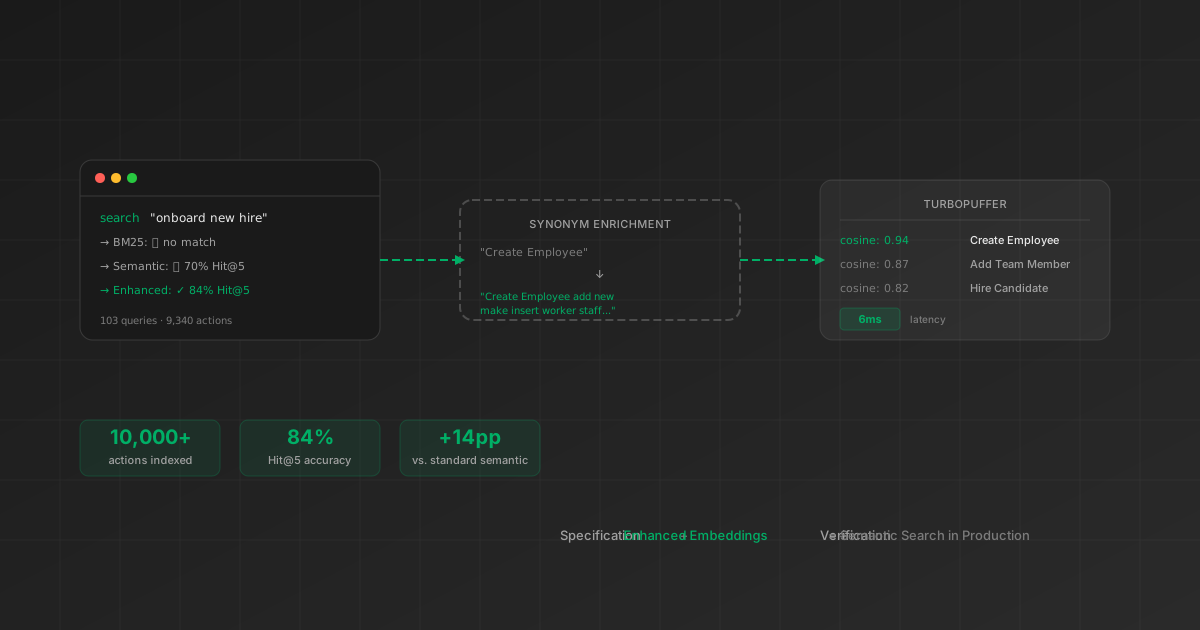
Blog
How enriched embeddings reach 84% Hit@5 across 9,340 actions, and why reranking did not help.
Blog
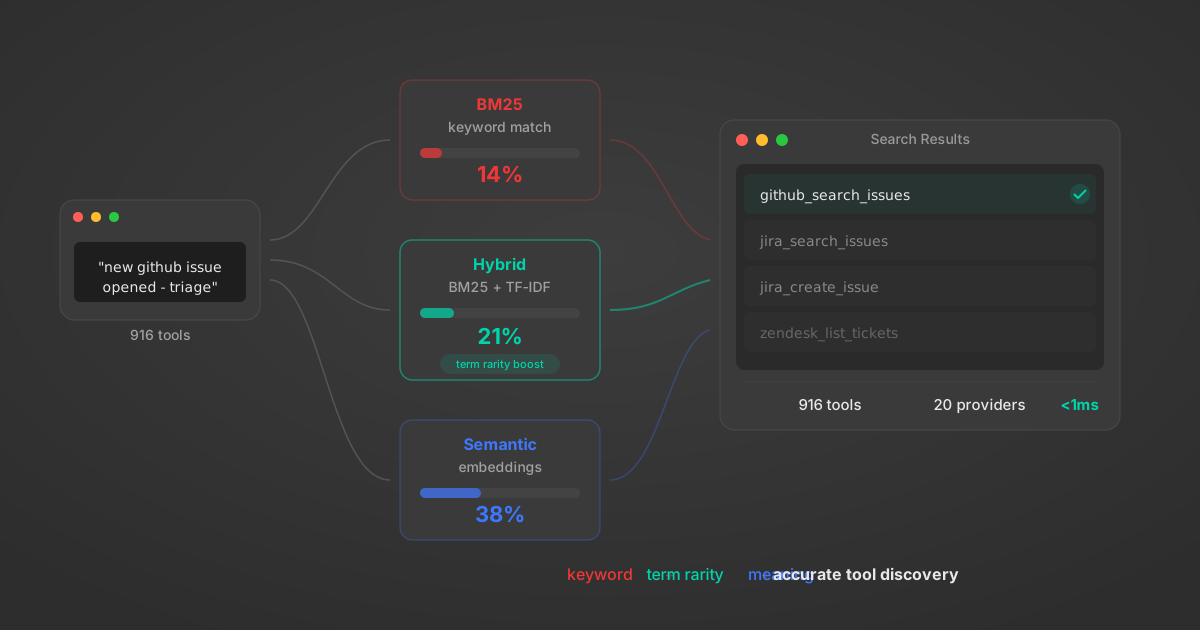
The evaluation behind our local fallback search: 2,700 test cases across 270 tools.
Blog
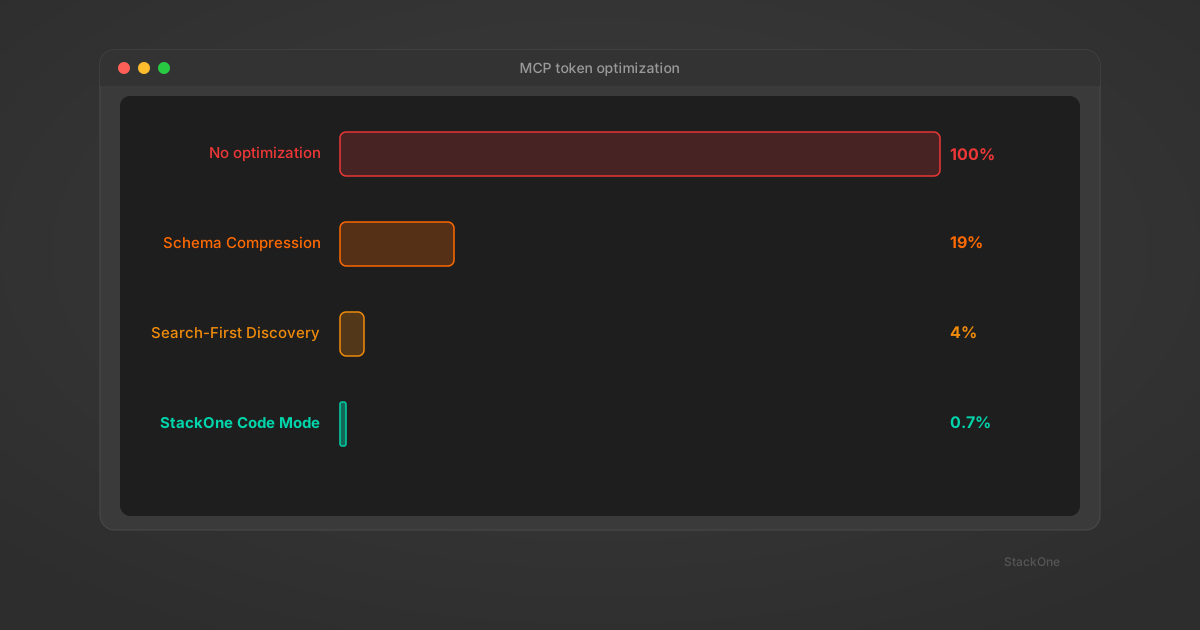
Four strategies, from schema compression to code execution, and the 460x reduction from search-first discovery.
Blog
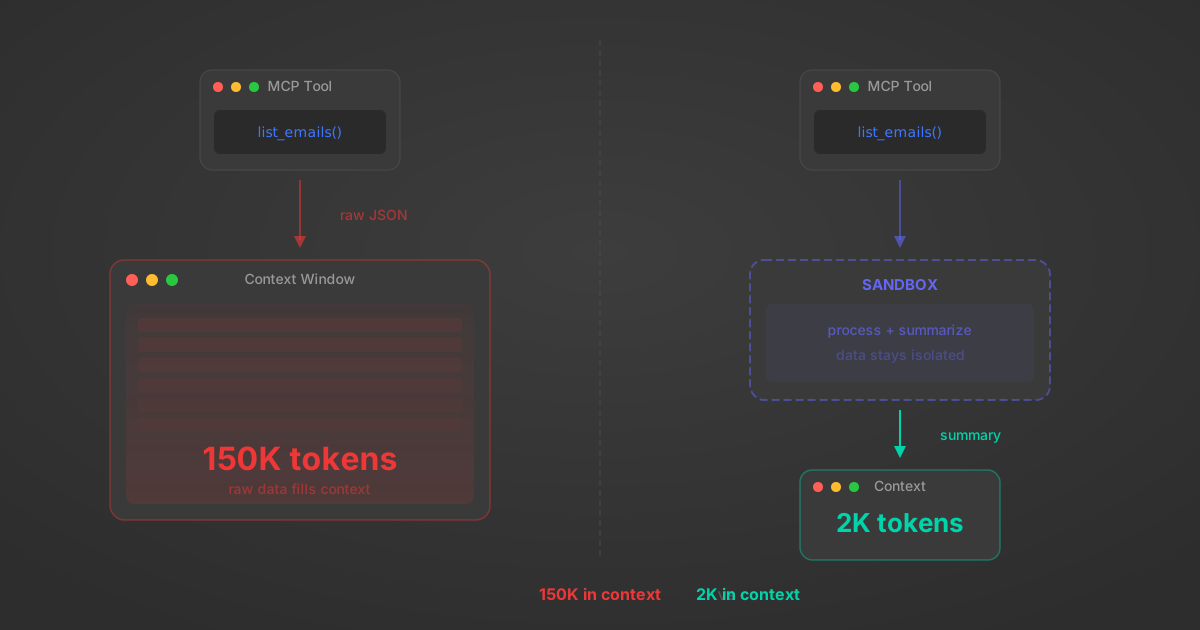
How tool schemas, API responses, and multi-step workflows compound to exhaust your agent's reasoning space.
okta_add_user_to_group. In our connector-scoped evaluation, with the connector known, the top result was the correct tool 92.8% of the time. This measures tool retrieval, not successful completion of the full task.auto mode uses semantic first and falls back to BM25+TF-IDF locally if the API is unreachable.okta_add_user_to_group needs an Okta userId and groupId; okta_list_users and okta_list_groups supply them. The agent still plans and executes the task, including matching identities across connectors.https://mcp.stackone.com/mcp into your client, sign in, and keep the Load tools when needed toggle on when you authorize. Your agent then sees two tools, tool_search and tool_execute, instead of hundreds of individual definitions. On token-based URLs, add tool-mode=search_execute to api.stackone.com/mcp instead. Neither route needs a migration or code changes. See StackOne MCP.https://mcp.stackone.com/mcp into any MCP client, including Claude, ChatGPT, Cursor, Windsurf, VS Code and Zed, then sign in with OAuth and authorize. Tool search is on by default, so the agent sees tool_search and tool_execute instead of hundreds of definitions. No SDK or code changes needed on the client side. See StackOne MCP for client guides.Connect your enterprise apps and put Tool Search to work.