


Vercel MCP Server
for AI Agents
Connect your AI agent to StackOne's Vercel MCP server and give it 371 MCP tools out of the box. Auth, tool execution, and security all managed.
 StackOne






Coverage
371 Agent Actions
Agents can read, write and delete in Vercel. Extend your agent's capabilities with custom actions.

Authentication
Agent Tool Authentication
Per-user OAuth in one call. Your Vercel MCP server gets session-scoped tokens with zero credentials stored on your infra.
Agent Auth →
Security
Agent Protection
Every Vercel tool response scanned for prompt injection in milliseconds, with 88.7% accuracy, all running on CPU.
Prompt Injection Defense →
Performance
Max Agent Context. Min Cost.
Free up to 96% of your agent's context window to enhance reasoning and reduce cost, on every Vercel call.
Tools Discovery →What is the Vercel MCP Server?
A Vercel MCP server lets AI agents read and write Vercel data through the Model Context Protocol, Anthropic's open standard for connecting LLMs to external tools. StackOne's Vercel MCP server ships with 371 pre-built actions, fully extensible via the Connector Builder, plus managed authentication, prompt injection defense, observability, and agent execution runtime. Connect it from MCP clients like Claude Desktop, Claude Code, Cursor, Goose, and VS Code, or from agent frameworks like OpenAI Agents SDK, LangChain, and Vercel AI SDK.
All Vercel MCP Tools
Every StackOne action for Vercel, ready for your agent. Read, write and delete, scoped to exactly what you need.
Access Groups
- Create Access Group
Creates an access group.
- List Access Groups
List the Access Groups of a Vercel team.
- Get Access Group
Get an Access Group of a Vercel team.
- Update Access Group
Update an access group.
- Delete Access Group
Deletes an access group.
Access Group Projects
- Create Access Group Project
Create an access group project.
- List Access Group Projects
List projects of an access group.
- Update Access Group Project
Update an access group project.
- Delete Access Group Project
Delete an access group project.
AI Gateway BYOK Credentials
- Create AI Gateway BYOK Credential
Create a BYOK credential.
- List AI Gateway BYOK Credentials
List BYOK credentials.
- Get AI Gateway BYOK Credential
Get a BYOK credential.
- Update AI Gateway BYOK Credential
Update a BYOK credential.
- Delete AI Gateway BYOK Credential
Delete a BYOK credential.
AI Gateway Rules
- Create AI Gateway Rule
Create rule.
- List AI Gateway Rules
List rules.
- Update AI Gateway Rule
Update rule.
- Delete AI Gateway Rule
Delete rule.
AI Gateway Virtual Model Configs
- Create AI Gateway Virtual Model Config
Create virtual model config.
- List AI Gateway Virtual Model Configs
List virtual model configs.
- Get AI Gateway Virtual Model Config
Get virtual model config.
- Update AI Gateway Virtual Model Config
Update virtual model config.
- Delete AI Gateway Virtual Model Config
Delete virtual model config.
Virtual Model Config By Slugs
- Get Virtual Model Config By Slug
Get virtual model config.
- Update Virtual Model Config By Slug
Update virtual model config.
- Delete Virtual Model Config By Slug
Delete virtual model config.
Alias
- Get Alias
Get an Alias.
- Delete Alias
Delete an Alias.
Redirects
- Get Redirects
Gets project-level redirects.
- Delete Redirects
Delete project-level redirects.
Versions
- Get Versions
Get the version history for a project's redirects.
- Update Version
Promote a staging version to production or restore a previous production version.
Certs
- Upload Cert
Upload a cert.
- List Certs
Get certs.
- Get Cert
Get cert by id.
- Remove Cert
Remove cert.
Deployment Check Runs
- Create Deployment Check Run
Create a check run.
- List Deployment Check Runs
List check runs for a deployment.
- Get Deployment Check Run
Get a check run.
- Update Deployment Check Run
Update a check run.
Project Checks
- Create Project Check
Create a check.
- List Project Checks
List all checks for a project.
- Get Project Check
Get a check.
- Update Project Check
Update a check.
- Delete Project Check
Delete a check.
Connector Project Connections
- List Connector Project Connections
List projects for a connector.
- Get Connector Project Connection
Get a connector project connection.
- Delete Connector Project Connection
Disconnect a connector from a project.
Connectors
- Create Connector
Create a connector.
- List Connectors
List connectors.
- Get Connector
Get a connector.
- Update Connector
Update a connector.
- Delete Connector
Delete a connector.
Deployments
- Create Deployment
Create a new deployment.
- List Deployments
List deployments.
- Get Deployment
Get a deployment by ID or URL.
- Delete Deployment
Delete a Deployment.
DNS Records
- Create DNS Record
Create a DNS record.
- List DNS Records
List existing DNS records.
- Get DNS Record
Get DNS Record.
- Update DNS Record
Update an existing DNS record.
- Delete DNS Record
Delete a DNS record.
Domains
- List Domains
List all the domains.
- Get Domain
Get Information for a Single Domain.
- Search Domains
Get Domain Availability and Pricing.
- Delete Domain
Remove a domain by name.
Drains
- Create Drain
Create a new Drain.
- Get Drain
Find a Drain by id.
- Get Drains
Retrieve a list of all Drains.
- Update Drain
Update an existing Drain.
- Delete Drain
Delete a drain.
Custom Environments
- Create Custom Environment
Create a custom environment for the current project.
- List Custom Environments
Retrieve custom environments.
- Get Custom Environment
Retrieve a custom environment.
- Update Custom Environment
Update a custom environment.
- Remove Custom Environment
Remove a custom environment.
Shared Env Variables
- Create Shared Env Variable
Create one or more shared environment variables.
- List Shared Env Variable
Lists all Shared Environment Variables for a team.
- Update Shared Env Variable
Updates one or more shared environment variables.
- Delete Shared Env Variable
Delete one or more Env Var.
Flag Segments
- Create Flag Segment
Create a segment.
- List Flag Segments
List segments.
- Get Flag Segment
Get a segment.
- Update Flag Segment
Update a segment.
- Delete Flag Segment
Delete a segment.
Flags
- Create Flag
Create a flag.
- List Flags
List flags.
- Get Flag
Get a flag.
- Update Flag
Update a flag.
- Delete Flag
Delete a flag.
Flag Settings
- Get Flag Settings
Get project flag settings.
- Update Flag Settings
Update project flag settings.
SDK Keys
- Create SDK Key
Create an SDK key.
- Get SDK Keys
Get all SDK keys.
- Delete SDK Key
Delete an SDK key.
Edge Configs
- Create Edge Config
Create a Global Config.
- List Edge Configs
Get Global Configs.
- Get Edge Config
Get a Global Config.
- Update Edge Config
Update a Global Config.
- Delete Edge Config
Delete a Global Config.
Edge Config Backups
- Get Edge Config Backup
Get Global Config backup.
- Get Edge Config Backups
Get Global Config backups.
Edge Config Items
- Get Edge Config Item
Get a Global Config item.
- Get Edge Config Items
Get Global Config items.
Edge Config Schemas
- Get Edge Config Schema
Get Global Config schema.
- Delete Edge Config Schema
Delete a Global Config's schema.
Edge Config Tokens
- Create Edge Config Token
Create a Global Config token.
- Get Edge Config Token
Get Global Config token meta data.
- Get Edge Config Tokens
Get all tokens of a Global Config.
- Delete Edge Config Tokens
Delete one or more Global Config tokens.
Unified Groups
- List Unified Groups
List unified groups in a Vercel team.
- Get Unified Group
Get a unified Vercel group by ID.
Unified Organizations
- List Unified Organizations
List unified organizations in Vercel.
- Get Unified Organization
Get a unified Vercel organization by ID.
Unified Roles
- List Unified Roles
List the team and project roles of Vercel.
- Get Unified Role
Get a unified Vercel role by ID.
Unified Users
- List Unified Users
List unified users in a Vercel team.
- Get Unified User
Get a unified Vercel team member by ID.
Configurations
- Get Configuration
Retrieve an integration configuration.
- Delete Configuration
Delete an integration configuration.
KMS Issuers
- Create KMS Issuer
Create an issuer.
- List KMS Issuers
List issuers.
- Get KMS Issuer
Get an issuer.
- Update KMS Issuer
Update an issuer.
- Delete KMS Issuer
Delete an issuer.
KMS Issuer Policys
- Create KMS Issuer Policy
Create an issuer policy.
- Update KMS Issuer Policy
Update an issuer policy.
- Delete KMS Issuer Policy
Delete an issuer policy.
Team Members
- List Team Members
List the members of a Vercel team.
- Update Team Member
Change the role of a Vercel team member or accept an access request.
- Remove Team Member
Remove a member from a Vercel team or dismiss an access request.
Microfrontends Groups
- Get Microfrontends Groups
List microfrontends groups.
- Update Microfrontends Group
Update a microfrontends group.
- Delete Microfrontends Group
Delete a microfrontends group.
Networks
- Create Network
Create a Secure Compute network.
- List Networks
List Secure Compute networks.
- Update Network
Update a Secure Compute network.
- Delete Network
Delete a Secure Compute network.
Private Link Endpoints
- Create Private Link Endpoint
Create a PrivateLink endpoint.
- List Private Link Endpoints
List PrivateLink endpoints.
- Update Private Link Endpoint
Update a PrivateLink endpoint.
- Delete Private Link Endpoint
Delete a PrivateLink endpoint.
Observability Configuration Projects
- Get Observability Configuration Projects
Lists disabled Observability Plus projects.
- Update Observability Configuration Project
Updates a disabled Observability Plus project setting.
Project Members
- Add Project Member
Adds a new member to a project.
- Get Project Members
List project members.
- Remove Project Member
Remove a Project Member.
Route Versions
- Get Route Versions
Get routing rule version history.
- Update Route Versions
Promote, restore, or discard a routing rule version.
Routes
- Add Route
Add a routing rule.
- Get Routes
Get project routing rules.
- Delete Routes
Delete routing rules.
Projects
- Create Project
Create a new project.
- List Projects
Retrieve a list of projects.
- Get Project
Find a project by id or name.
- Update Project
Update an existing project.
- Delete Project
Delete a Project.
Project Domains
- Add Project Domain
Add a domain to a project.
- Get Project Domain
Get a project domain.
- Get Project Domains
Retrieve project domains by project by id or name.
- Move Project Domain
Move a project domain.
- Update Project Domain
Update a project domain.
- Remove Project Domain
Remove a domain from a project.
Project Envs
- Create Project Env
Create one or more environment variables.
- Get Project Env
Retrieve the decrypted value of an environment variable of a project by id.
- Batch Remove Project Env
Batch remove environment variables.
- Remove Project Env
Remove an environment variable.
Project Avatars
- Upload Project Avatar
Upload a project avatar.
- Delete Project Avatar
Delete a project avatar.
Rolling Release Configs
- Get Rolling Release Config
Get rolling release configuration.
- Update Rolling Release Config
Update the rolling release settings for the project.
- Delete Rolling Release Config
Delete rolling release configuration.
Drives
- List Drives
List drives.
- Get Drive
Get a drive.
- Delete Drive
Delete a drive.
Session Commands
- List Session Commands
List commands.
- Get Session Command
Get a command.
Session Snapshots
- Create Session Snapshot
Create a snapshot.
- List Session Snapshots
List snapshots.
- Get Session Snapshot
Get a snapshot.
- Delete Session Snapshot
Delete a snapshot.
Sessions
- List Sessions
List sessions.
- Get Session
Get a session.
Sandboxs
- Create Sandbox
Create a named sandbox.
- Update Sandbox
Update a sandbox.
- Delete Sandbox
Delete a sandbox.
Bypass IPs
- Add Bypass IP
Create System Bypass Rule.
- List Bypass IPs
Read System Bypass.
- Remove Bypass IP
Remove System Bypass Rule.
Conditional Bypass
- Create Conditional Bypass
Create conditional firewall bypass.
- Get Conditional Bypass
Get conditional firewall bypasses.
- Delete Conditional Bypass
Delete conditional firewall bypass.
Firewall Config Versions
- Get Firewall Config Version
Read Firewall Configuration.
- Delete Firewall Config Version
Returns activated WAF config.
Blob Stores
- Create Blob Store
Create a Blob store.
- Delete Blob Store
Delete a Blob store.
Teams
- Create Team
Create a Team.
- List Teams
List the Vercel teams the access token can see.
- Get Team
Get a Vercel team by ID.
Auth Tokens
- Create Auth Token
Create an Auth Token.
- List Auth Tokens
List Auth Tokens.
- Get Auth Token
Get Auth Token Metadata.
- Delete Auth Token
Delete an authentication token.
Vercel CI Invocations
- List Vercel CI Invocations
List invocations for a team, optionally filtered by repository and invocation metadata.
- Get Vercel CI Invocation
Get a specific invocation attempt.
Vercel CI Job Definitions
- List Vercel CI Job Definitions
List job definitions for an invocation attempt.
- Get Vercel CI Job Definition
Get a specific job definition.
Vercel CI Job Runs
- List Vercel CI Job Runs
List all runs for a job definition.
- Get Vercel CI Job Run
Get a specific job run attempt.
Vercel CI Repository Settings
- Get Vercel CI Repository Settings
Get Vercel CI settings for a connected repository.
- Update Vercel CI Repository Settings
Enable or disable Vercel CI for a connected repository.
Vercel CI Task Analysis
- Create Vercel CI Task Analysis
Start an asynchronous Vercel CI task analysis.
- Get Vercel CI Task Analysis
Get the current status of a Vercel CI task analysis.
Other (158)
- Upload File
Upload Deployment Files.
- Create Or Transfer Domain
Add an existing domain to the Vercel platform.
- Create Integration Store Direct
Create integration store (free and paid plans).
- Create KMS Signing Key
Create a signing key.
- Create Microfrontends Group With Applications
Create a microfrontends group with applications.
- Create Observability Query
Create Observability Query.
- Create Project Transfer Request
Create project transfer request.
- Create Trace Session
Create a trace session token for a deployment.
- Create Session Directory
Create a directory.
- Create Vercel CI Task Config Pull Request
Create a GitHub pull request that adds Vercel CI tags for the completed analysis.
- List Access Group Members
List the members of an Access Group.
- List AI Gateway Budget Defaults
List AI Gateway budget defaults.
- List AI Gateway Budgets
List AI Gateway budgets.
- List AI Gateway Routers
List AI Gateway routers.
- List Aliases
List aliases.
- List Deployment Aliases
List Deployment Aliases.
- List Billing Charges
List FOCUS billing charges.
- List Contract Commitments
List FOCUS contract commitments.
- List Check Runs
List runs for a check.
- List Project Connector Connections
List connectors for a project.
- List Deployment Files
List Deployment Files.
- Get Deployment Events
Get deployment events.
- Get Deployment File Contents
Get Deployment File Contents.
- Get Domain Config
Get a Domain's configuration.
- Get Domain Project Domains
List Project Domains by Apex Domain.
- Get Domain Verification Record
Get Domain Verification Record.
- Get Contact Info Schema
Get contact info schema.
- Get Domain Availability
Get availability for a domain.
- Get Domain Contact Verification
Get contact verification status for a domain.
- Get Domain Price
Get price data for a domain.
- Get Order
Get a domain order.
- Get Supported Tlds
Get supported TLDs.
- Get Tld
Get TLD.
- Get Tld Price
Get TLD price data.
- Get Bulk Availability
Get availability for multiple domains.
- Get Bulk Price
Get price data for multiple domains.
- Get Shared Env Var
Retrieve the decrypted value of a Shared Environment Variable by id.
- List Flag Label Counts
List attribute label counts.
- List Flag Labels
List attribute labels.
- List Flag Versions
List flag versions.
- List Team Flag Settings
List team project flag settings.
- List Team Flags
List all flags for a team.
- Get Deployment Feature Flags
Retrieve the feature flags of a deployment.
- Get Unified Credentials
Get the current Vercel connection's unified credentials and identity.
- List Integration Configurations
Get configurations for the authenticated user or team.
- Get Billing Plans
List integration billing plans.
- Get Configuration Products
List products for integration configuration.
- Search Repo
List git repositories linked to namespace by provider.
- Get Microfrontends Config
Get microfrontends config for a deployment.
- Get Microfrontends Config For Project
Get microfrontends config for a project.
- Get Microfrontends In Group
List projects in a microfrontends group.
- Get Observability Metric Schema
Get Observability Metric Schema.
- Get Observability Schema
Get Observability Schema.
- List Promote Aliases
Gets a list of aliases with status for the current promote.
- Get Project Trace
Get a project trace by request ID.
- Get Project Token
Generate a project OIDC token.
- Get Rolling Release
Get the active rolling release information for a project.
- Get Rolling Release Billing Status
Get rolling release billing status.
- List Named Sandboxes
List sandboxes.
- Get Named Sandbox
Get a named sandbox.
- Get Session Command Logs
Stream command logs.
- Get Or Create Drive
Get or create a drive.
- Get Active Attack Status
Read active attack data.
- Get Active Firewall Config
Returns activated WAF config.
- Get Security Firewall Events
Read Firewall Actions by Project.
- Get Security Firewall Events Summary
Read Firewall Actions Summary by Project.
- Get Store
Get a store.
- Get Current User
Get the Vercel user that owns the access token.
- Get Current Token
Get the metadata of the Vercel access token in use.
- List Event Types
List Event Types.
- List User Events
List User Events.
- List Vercel CI Branches
List Vercel CI branch suggestions for a team.
- List Vercel CI Invocation Attempts
List all attempts for an invocation.
- List Vercel CI Task Analysis Tasks
List discovered tasks for a completed Vercel CI task analysis.
- List Vercel CI Task Definitions
List all task definitions for a job run.
- List Vercel CI Task Runs
List task runs for a job run.
- Get Vercel CI Invocation Logs
Get log lines for an invocation attempt.
- Get Vercel CI Invocation Tree
Get an invocation with its jobs and tasks.
- Get Vercel CI Job Run Logs
Get log lines for a specific job run attempt.
- Get Vercel CI Task Logs
Get log lines for the tasks of an invocation attempt.
- Get Vercel CI Task Run Logs
Get log lines for a specific task run attempt.
- Search Vercel CI Logs
Search the task logs of several invocation attempts.
- Update Domain Auto Renew
Update auto-renew for a domain.
- Update Domain Nameservers
Update nameservers for a domain.
- Update Static IPs
Configures Static IPs for a project.
- Update Microfrontends
Update the microfrontends settings.
- Update Project Protection Bypass
Update Protection Bypass for Automation.
- Update Rollback Description
Updates the description for a rollback.
- Update Session Network Policy
Update network policy.
- Update Attack Challenge Mode
Update Attack Challenge mode.
- Update Firewall Config
Update Firewall Configuration.
- Read Access Group Project
Reads an access group project.
- Upsert AI Gateway Budget
Upsert AI Gateway budget.
- Upsert AI Gateway Budget Default
Upsert AI Gateway budget default.
- Archive AI Gateway Budget
Archive AI Gateway budget.
- Archive AI Gateway Budget Default
Archive AI Gateway budget default.
- Assign Alias
Assign an Alias.
- Patch URL Protection Bypass
Update the protection bypass for a URL.
- Edit Redirect
Edit a project-level redirect.
- Restore Redirects
Restore staged project-level redirects to their production version.
- Stage Redirects
Stages new redirects for a project.
- Issue Cert
Issue a new cert.
- Eject Managed Connector
Eject a managed connector.
- Replace Connector Trigger Destinations
Update connector trigger destinations.
- Upsert Connector Project Connection
Create or update a connector project connection.
- Cancel Deployment
Cancel a deployment.
- Claim Domain Ownership
Claim Domain Ownership.
- Patch Domain
Update or move apex domain.
- Replace DNS Records
Replace DNS Records.
- Buy Domains
Buy multiple domains.
- Buy Single Domain
Buy a domain.
- Test Drain
Validate Drain delivery configuration.
- Invalidate By Src Images
Invalidate by source image.
- Invalidate By Tags
Invalidate by tag.
- Unlink Shared Env Variable
Disconnects a shared environment variable for a given project.
- Lookup Flag Labels
Look up attribute labels.
- Patch Edge Config Items
Update Global Config items in batch.
- Patch Edge Config Schema
Update Global Config schema.
- Restore Edge Config Backup
Restore Global Config backup.
- Git Namespaces
List git namespaces by provider.
- Connect Integration Resource To Project
Connect integration resource to project.
- Activate KMS Signing Key
Activate a signing key.
- Revoke KMS Signing Key
Revoke a signing key.
- Invite Users To Team
Invite a person to a Vercel team by email.
- Read Network
Read a Secure Compute network.
- Read Private Link Endpoint
Read a PrivateLink endpoint.
- Edit Route
Edit a routing rule.
- Generate Route
Generate a routing rule from natural language.
- Stage Routes
Stage routing rules.
- Filter Project Envs
Retrieve the environment variables of a project by id or name.
- Accept Project Transfer Request
Accept project transfer request.
- Edit Project Env
Edit an environment variable.
- Pause Project
Pause a project.
- Request Promote
Point production traffic to a given deployment.
- Request Rollback
Point production traffic to a previous production deployment by ID.
- Unpause Project
Unpause a project.
- Verify Project Domain
Verify project domain.
- Approve Rolling Release Stage
Update the active rolling release to the next stage for a project.
- Complete Rolling Release
Complete the rolling release for the project.
- Start Rolling Release
Start a rolling release for the project.
- Extend Session Timeout
Extend session timeout.
- Fork Drive
Fork a drive.
- Fork Sandbox
Fork a named sandbox.
- Kill Session Command
Kill a command.
- Read Session File
Read a file.
- Run Session Command
Execute a command.
- Stop Session
Stop a session.
- Write Session Command Stdin
Write to command stdin.
- Write Session Files
Write files.
- Activate Firewall Config Version
Returns activated WAF config.
- Generate Firewall Rule
Generate a firewall rule from natural language.
- Put Firewall Config
Put Firewall Configuration.
- Patch Team
Update a Team.
- Retry Vercel CI Invocation
Retry a terminal Vercel CI invocation attempt.
- Aggregate Events
Aggregates custom events.
- Aggregate Pageviews
Aggregates page views.
- Count Events
Counts custom events.
- Count Pageviews
Counts page views.
Set Up Your Vercel MCP Server in Minutes
One endpoint. Any framework. Your agent is talking to Vercel in under 10 lines of code.
Agent Frameworks


 JSON
{
  "mcpServers": {
    "stackone": {
      "command": "npx",
      "args": [
        "-y",
        "mcp-remote@latest",
        "https://api.stackone.com/mcp?x-account-id=<account_id>",
        "--header",
        "Authorization: Basic <YOUR_BASE64_TOKEN>"
      ]
    }
  }
}
Check More Developer Tools MCP Servers
222+ actions
185+ actions
182+ actions
164+ actions
156+ actions
153+ actions
152+ actions
Platform Resources
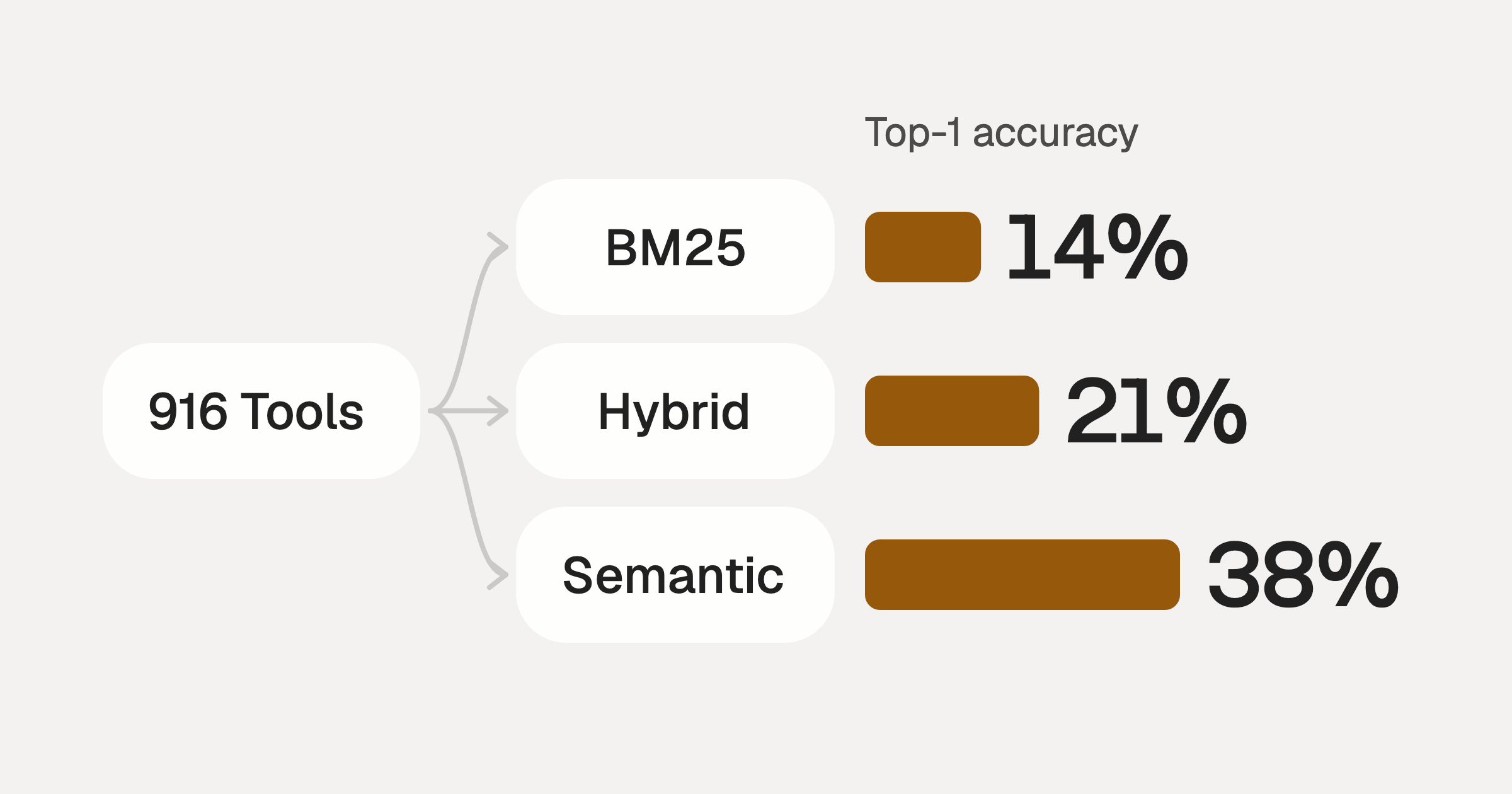
Comparing BM25, TF-IDF, and Hybrid Search for MCP Tool Discovery
Benchmarking BM25, TF-IDF, and hybrid search for MCP tool discovery across 916 tools. The 80/20 TF-IDF/BM25 hybrid hits 21% Top-1 accuracy in under 1ms.
10 min
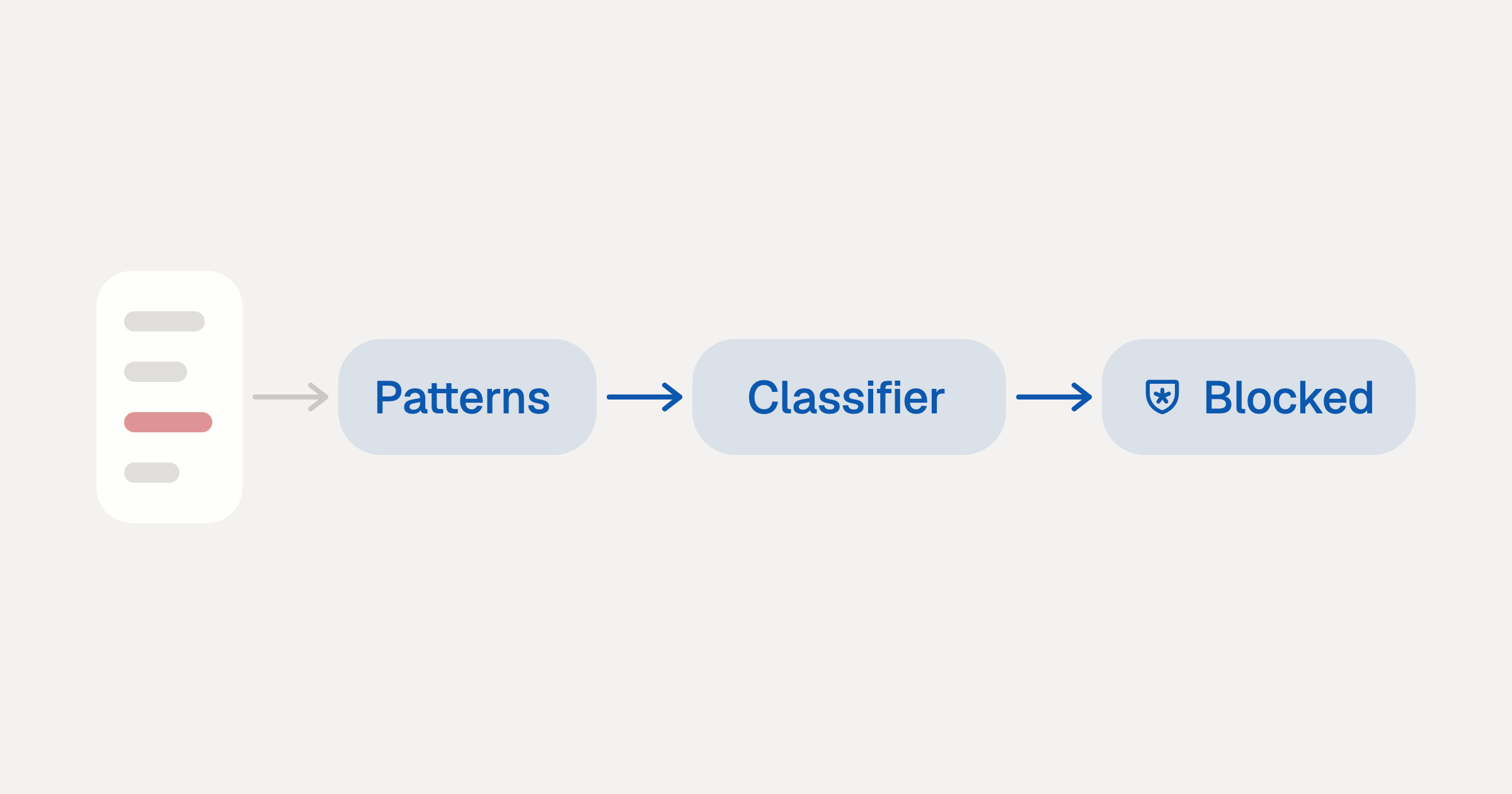
Indirect Prompt Injection Defense for MCP Tools: A Technical Guide
MCP tools that read emails, CRM records, and tickets are indirect prompt injection vectors. Here's how we built a two-tier defense that scans tool results in ~11ms.
12 min
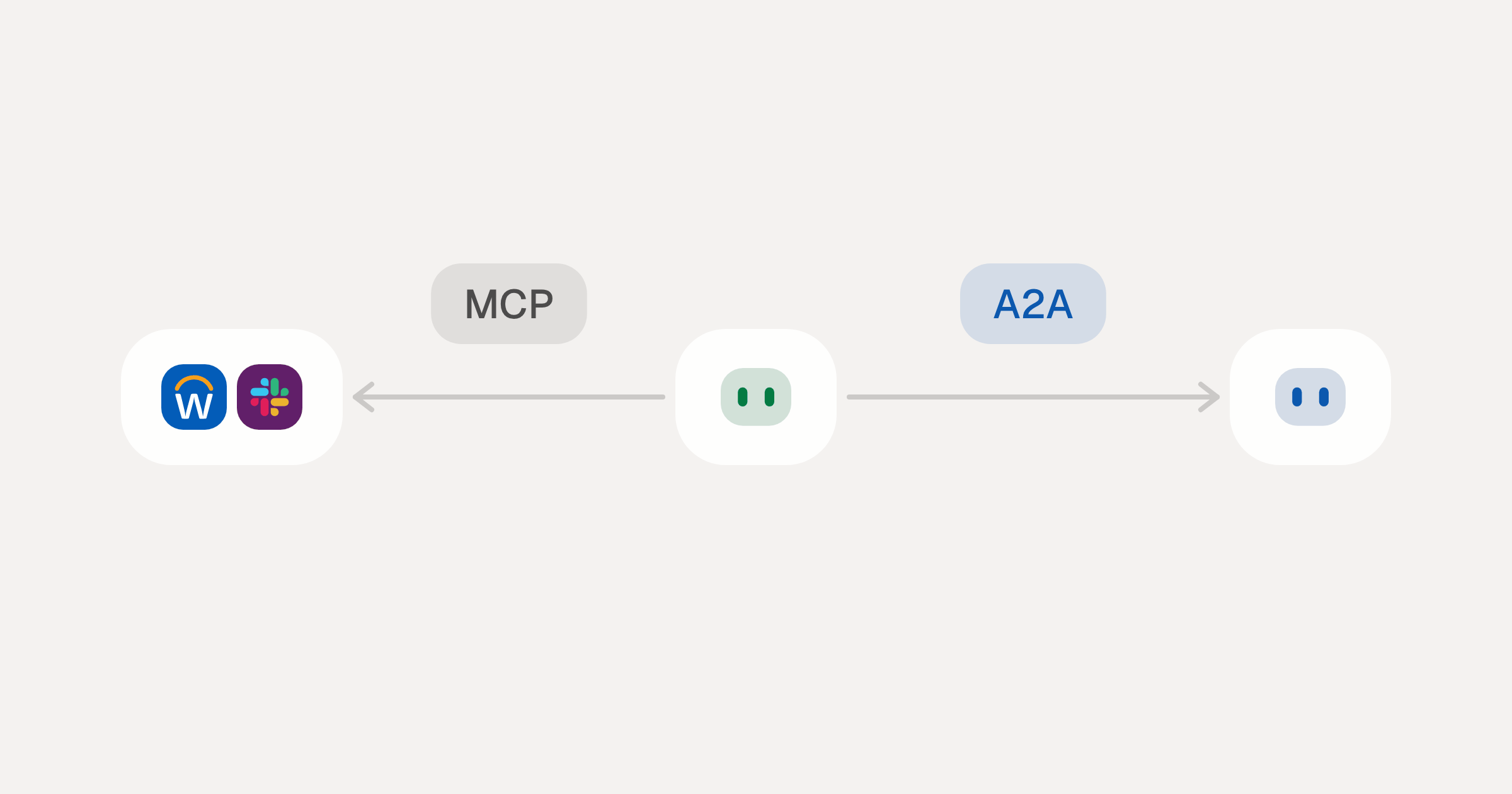
MCP vs A2A: Architecture, Security, and When to Use Each
MCP vs A2A: what each protocol standardizes, how they differ, the security risks they share, and when to use one, both or a hybrid.
12 min
MCP vs API: What Hundreds of Connector Builds Taught Us
MCP wraps APIs, it doesn't replace them. After building hundreds of connectors that serve both, here's when each approach wins.
14 min read
Vercel MCP Server FAQ
Does StackOne have a Vercel MCP server?
Vercel MCP server vs direct API integration: what's the difference?
How does Vercel authentication work for AI agents?
origin_owner_id.Are Vercel MCP tools vulnerable to prompt injection?
What is the context bloat of a Vercel agent and how do I avoid it?
Can I limit which actions my Vercel agent can access?
Can I create custom agent actions for my Vercel MCP server?
When should I NOT use a Vercel MCP server?
What AI frameworks and AI clients does the StackOne Vercel MCP server support?
Put your AI agents to work
Connect AI to every company system and control what it can do in each one, down to the field.