


SharePoint MCP Server
for AI Agents
Connect your AI agent to StackOne's SharePoint MCP server and give it 33 MCP tools out of the box. Auth, tool execution, and security all managed.
 StackOne







Coverage
33 Agent Actions
Agents can read and write in SharePoint. Extend your agent's capabilities with custom actions.

Authentication
Agent Tool Authentication
Per-user OAuth in one call. Your SharePoint MCP server gets session-scoped tokens with zero credentials stored on your infra.
Agent Auth →
Security
Agent Protection
Every SharePoint tool response scanned for prompt injection in milliseconds, with 88.7% accuracy, all running on CPU.
Prompt Injection Defense →
Performance
Max Agent Context. Min Cost.
Free up to 96% of your agent's context window to enhance reasoning and reduce cost, on every SharePoint call.
Tools Discovery →What is the SharePoint MCP Server?
StackOne's SharePoint MCP server lets an AI agent search SharePoint sites, read lists and list items, and browse, download and upload files in document libraries. After a one-time admin app registration in Microsoft Entra ID, each user links their own Microsoft account through OAuth, and the agent acts on that user's behalf with delegated Microsoft Graph permissions. It works over the Model Context Protocol from MCP clients like Claude Desktop, Claude Code, Cursor and Goose, and you can add actions with the Connector Builder.
All SharePoint MCP Tools
Every StackOne action for SharePoint, ready for your agent. Read and write, scoped to exactly what you need.
Sites
- List Sites
Search and retrieve SharePoint sites across the organization using keyword search. This is the primary entry point for discovering sites - use "*" to list all accessible sites or provide specific search terms to find sites by name, description, or content.
- Get Site
Retrieve complete metadata for a specific SharePoint site by its unique identifier, including configuration details, timestamps, and optionally related resources like document libraries and lists. Use this after list_sites to get full site details or to verify site existence before performing operations.
- Search Sites
Find SharePoint sites matching a keyword search query with relevance-ranked results. Use this when you have a search term or site name fragment from a user and need to find matching sites. Unlike list_sites, search is required here and results are ordered by relevance rather than alphabetically.
Items
- List Items
Retrieve all items from a SharePoint list as structured data records with their field values. Supports filtering by column values and selecting specific columns. IMPORTANT - You must use expand=fields to get column data as field values are not included by default.
- Get Item
Retrieve a single item from a SharePoint list by its ID with complete metadata and field values. Use this to get detailed item data before updates, verify item existence, retrieve the web URL for sharing, or get the eTag for optimistic concurrency control.
Drive Item Contents
- Upload Drive Item Content
Upload a file (up to about 4 MB) from base64-encoded content into a SharePoint document library folder, creating a new file or replacing one with the same name.
- Download Drive Item Content
Download a file from a SharePoint document library in its original format as base64-encoded content, optionally as a byte range of the file.
Sessions
- Create Upload Session
Start a resumable upload session for uploading a new large file to a SharePoint document library folder in chunks.
- Get Upload Session
Get the status of an upload session, including which byte ranges are still missing, to resume an interrupted upload.
Other (24)
- Create Upload Session For Existing File
Start a resumable upload session for replacing the content of an existing file in a SharePoint document library with a large file uploaded in chunks.
- Upload Bytes To Upload Session
Upload one byte range of a file to an upload session created with create_upload_session or create_upload_session_for_existing_file. Send ranges in order; the last range completes the file.
- Get Site By Path
Retrieve a SharePoint site using its URL hostname and server-relative path instead of an opaque ID. This is the preferred method when you have a SharePoint URL from a user, document link, or browser address bar and need to resolve it to a site resource with its API-usable ID.
- List Subsites
Retrieve all immediate child subsites nested under a parent SharePoint site. Use this to navigate site hierarchies, discover departmental or project sites organized under a parent team site, and build site tree structures for navigation interfaces.
- Get Root Site
Retrieve the tenant's root SharePoint site collection without needing to know its ID. This is the primary entry point for discovering the organization's SharePoint structure, hostname, and top-level sites when starting fresh without prior context.
- Get Site Columns
Retrieve all site column definitions available at the site level for schema discovery. Site columns are reusable metadata field templates that can be added to multiple lists within the site, promoting consistent data schemas across the organization.
- Get Site Content Types
Retrieve all content type definitions available at a SharePoint site for understanding document and item templates. Content types bundle metadata columns with settings and behaviors, enabling consistent categorization of documents like contracts, invoices, or project documents across lists and libraries.
- List Site Lists
Retrieve all SharePoint lists in a site including document libraries, custom data lists, task lists, and system lists. Use this to discover available structured data containers before querying their items or to inventory a site's data assets.
- Get List
Retrieve detailed metadata for a specific SharePoint list including its template type, content type settings, creation date, and web URL. Use this to verify list existence, get sharing URLs, or understand list configuration before performing data operations.
- Get List Columns
Retrieve the complete schema of all columns in a SharePoint list including their data types, validation rules, and configuration. Essential for understanding list structure before querying items, building forms, or mapping data fields.
- Get List Operations
Retrieve the status of long-running background operations on a SharePoint list such as bulk imports, content type synchronization, or schema changes. Use this to monitor async operation progress, identify failed operations, or audit operation history.
- List Site Drives
Retrieve all document libraries (drives) available in a SharePoint site including their storage quota, ownership, and configuration. Use this to discover available file storage locations before browsing files or uploading documents.
- Get Drive
Retrieve detailed metadata for a specific SharePoint document library including current storage quota status, ownership information, and configuration. Use this to check storage availability before uploads, monitor quota usage, or get the shareable web URL.
- List Drive Root Children
List all files and folders at the root level of a SharePoint document library. Returns item metadata including name, size, type (file/folder), MIME type, and timestamps. Use list_drive_item_children to browse into subfolders.
- List Drive Item Children
List all files and folders within a specific folder in a SharePoint document library. Use this to navigate into subfolders after using list_drive_root_children to browse the root level.
- Get Drive Item
Retrieve complete metadata for a specific file or folder in SharePoint, including size, MIME type, permissions, and sharing links.
- List Drive Item Versions
List the version history of a file in a SharePoint document library, newest first. Use the returned version ids with download_drive_item_version_content to download earlier versions.
- Download Drive Item Version Content
Download an earlier version of a file in a SharePoint document library as base64-encoded content, optionally as a byte range.
- Download Drive Item Thumbnail Content
Download a thumbnail image of a file in a SharePoint document library as base64-encoded content, in a standard or custom size.
- Download Shared Drive Item Content
Download a SharePoint or OneDrive file from a share id or an encoded sharing URL as base64-encoded content, without knowing its drive or item id.
- Convert Drive Item Content
Download a file from a SharePoint document library converted to PDF, HTML or a preview image, as base64-encoded content.
- Replace Drive Item Content
Replace the content of an existing file in a SharePoint document library (up to about 4 MB) from base64-encoded content, keeping its id, name and location.
- Cancel Upload Session
Cancel an upload session and discard the bytes uploaded to it so far.
- Complete Upload Session
Create the file from an upload session that was started with deferCommit set to true, after all byte ranges have been uploaded.
Set Up Your SharePoint MCP Server in Minutes
One endpoint. Any framework. Your agent is talking to SharePoint in under 10 lines of code.
Agent Frameworks


 JSON
{
  "mcpServers": {
    "stackone": {
      "command": "npx",
      "args": [
        "-y",
        "mcp-remote@latest",
        "https://api.stackone.com/mcp?x-account-id=<account_id>",
        "--header",
        "Authorization: Basic <YOUR_BASE64_TOKEN>"
      ]
    }
  }
}Platform Resources
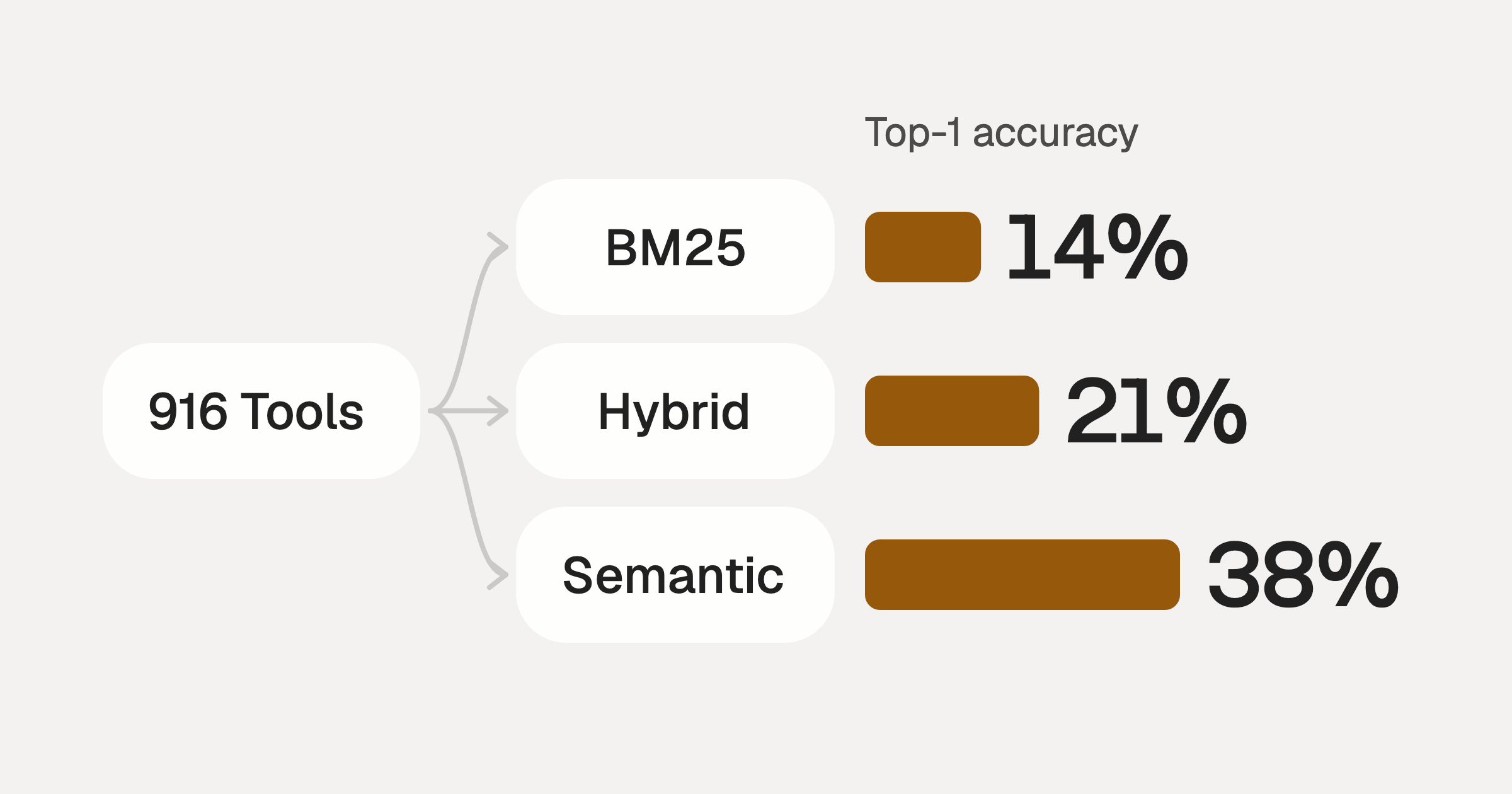
Comparing BM25, TF-IDF, and Hybrid Search for MCP Tool Discovery
Benchmarking BM25, TF-IDF, and hybrid search for MCP tool discovery across 916 tools. The 80/20 TF-IDF/BM25 hybrid hits 21% Top-1 accuracy in under 1ms.
10 min
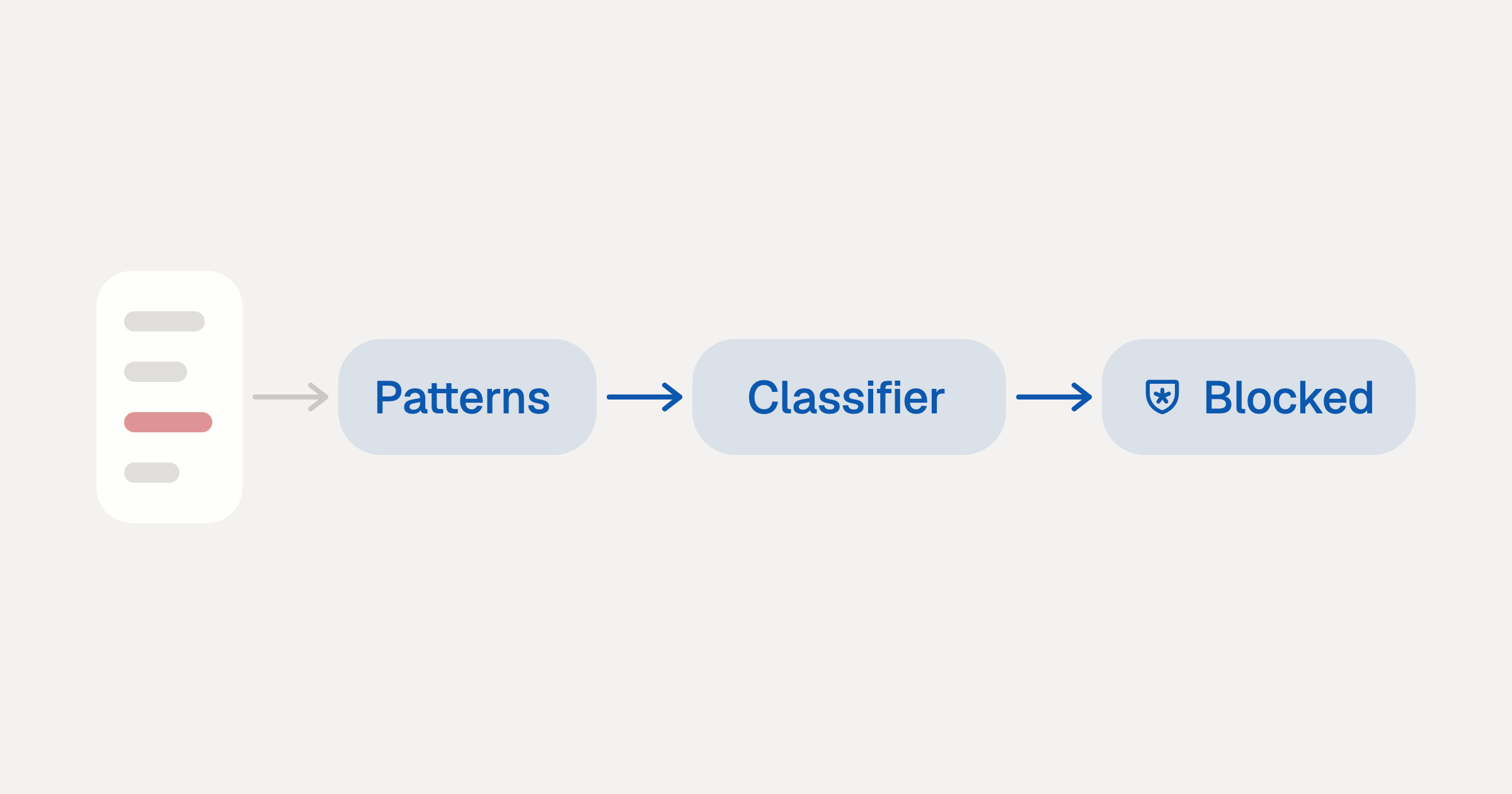
Indirect Prompt Injection Defense for MCP Tools: A Technical Guide
MCP tools that read emails, CRM records, and tickets are indirect prompt injection vectors. Here's how we built a two-tier defense that scans tool results in ~11ms.
12 min
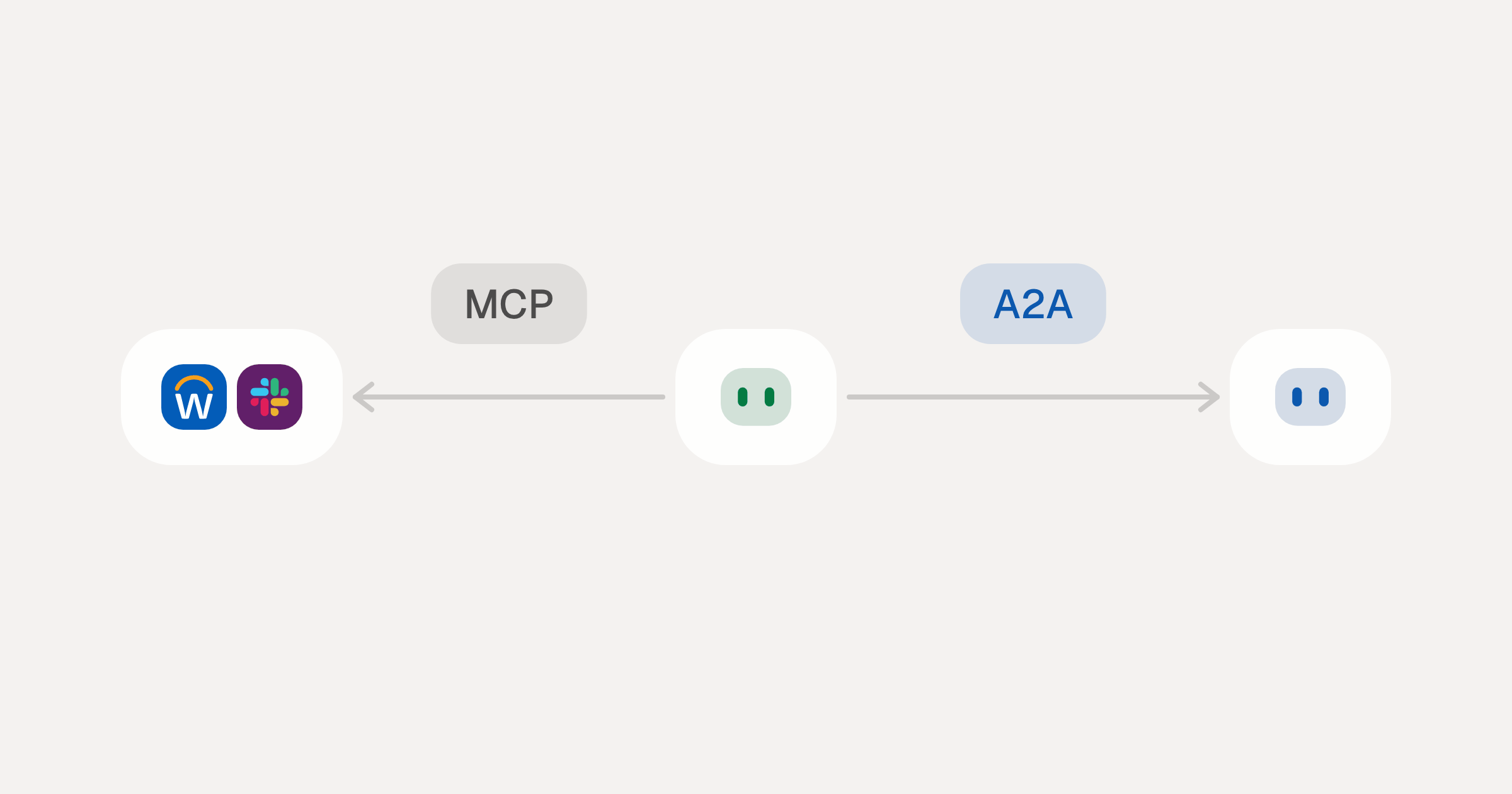
MCP vs A2A: Architecture, Security, and When to Use Each
MCP vs A2A: what each protocol standardizes, how they differ, the security risks they share, and when to use one, both or a hybrid.
12 min
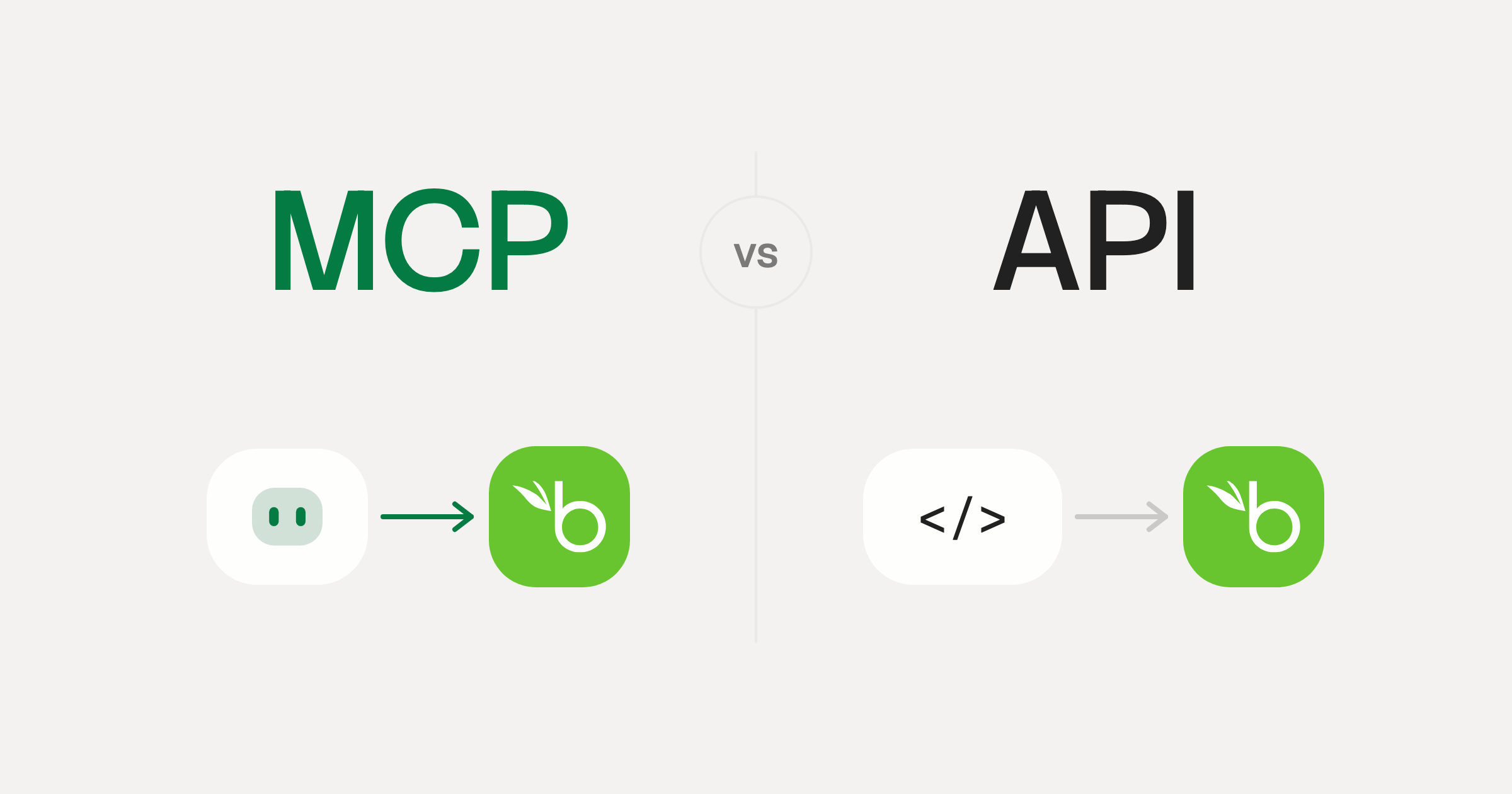
MCP vs API: What Hundreds of Connector Builds Taught Us
MCP wraps APIs, it doesn't replace them. After building hundreds of connectors that serve both, here's when each approach wins.
14 min read
SharePoint MCP Server FAQ
Does StackOne have a SharePoint MCP server?
SharePoint MCP server vs direct API integration: what's the difference?
How does SharePoint authentication work for AI agents?
origin_owner_id.Are SharePoint MCP tools vulnerable to prompt injection?
What is the context bloat of a SharePoint agent and how do I avoid it?
Can I limit which actions my SharePoint agent can access?
Can I create custom agent actions for my SharePoint MCP server?
When should I NOT use a SharePoint MCP server?
What AI frameworks and AI clients does the StackOne SharePoint MCP server support?
Put your AI agents to work
Connect AI to every company system and control what it can do in each one, down to the field.