


Recruitee MCP Server
for AI Agents
Connect your AI agent to StackOne's Recruitee MCP server and give it 155 MCP tools out of the box. Auth, tool execution, and security all managed.
 StackOne







Coverage
155 Agent Actions
Agents can read, write and delete in Recruitee. Extend your agent's capabilities with custom actions.

Authentication
Agent Tool Authentication
Per-user OAuth in one call. Your Recruitee MCP server gets session-scoped tokens with zero credentials stored on your infra.
Agent Auth →
Security
Agent Protection
Every Recruitee tool response scanned for prompt injection in milliseconds, with 88.7% accuracy, all running on CPU.
Prompt Injection Defense →
Performance
Max Agent Context. Min Cost.
Free up to 96% of your agent's context window to enhance reasoning and reduce cost, on every Recruitee call.
Tools Discovery →What is the Recruitee MCP Server?
A Recruitee MCP server lets AI agents read and write Recruitee data through the Model Context Protocol, Anthropic's open standard for connecting LLMs to external tools. StackOne's Recruitee MCP server ships with 155 pre-built actions, fully extensible via the Connector Builder, plus managed authentication, prompt injection defense, observability, and agent execution runtime. Connect it from MCP clients like Claude Desktop, Claude Code, Cursor, Goose, and VS Code, or from agent frameworks like OpenAI Agents SDK, LangChain, and Vercel AI SDK.
All Recruitee MCP Tools
Every StackOne action for Recruitee, ready for your agent. Read, write and delete, scoped to exactly what you need.
Attachments
- Create Attachment
Upload an attachment from a remote URL
- Delete Attachment
Delete an attachment
Candidates
- Create Candidate
Create a new candidate record
- List Candidates
Retrieve all candidates in the system
- Get Candidate
Retrieve a single candidate by ID
- Search Candidates
Search candidates with advanced filtering
- Update Candidate
Update an existing candidate's information
- Delete Candidate
Delete a candidate from the system
Candidate CVs
- Update Candidate CV
Update a candidate's CV from a remote URL
- Delete Candidate CV
Delete the candidate's CV file
Candidate Notes
- Create Candidate Note
Add a note to a candidate
- List Candidate Notes
Get all notes for a candidate
Candidate Custom Fields
- Create Candidate Custom Field
Add a custom field to a candidate profile
- Update Candidate Custom Field
Update the values of a candidate's profile field
- Delete Candidate Custom Field
Remove a field from a candidate's profile
Candidate Followers
- Add Candidate Followers
Add team members as followers of a candidate
- Remove Candidate Followers
Remove team members from the followers of a candidate
Candidate Tags
- Create Candidate Tags
Add tags to a candidate
- Create Candidate Tags
Create candidate tags in the company
- List Candidate Tags
List candidate tags in the company
- Update Candidate Tag
Rename a candidate tag
- Remove Candidate Tags
Remove tags from a candidate
- Delete Candidate Tags
Delete candidate tags from the company
Candidate Sources
- Create Candidate Sources
Add sources to a candidate
- Remove Candidate Sources
Remove sources from a candidate
Dynamic Fields
- Create Dynamic Field
Create a custom field for job offers and requisitions
- List Dynamic Fields
List custom fields for job offers and requisitions
Departments
- Create Department
Create one or more departments
- List Departments
Retrieve all departments in the company
- Get Department
Get a department by ID
- Update Department
Rename a department
- Delete Department
Delete a department
- Delete Departments
Delete several departments at once
Interview Events
- Create Interview Event
Schedule an interview with a candidate
- List Interview Events
List scheduled interviews
- Get Interview Event
Get an interview event
- Delete Interview Event
Cancel an interview event
Interview Results
- Create Interview Result
Rate a candidate
- List Interview Results
List interview evaluations and questionnaire results
- Get Interview Result
Get an interview evaluation
- Update Interview Result
Update an interview evaluation
- Delete Interview Result
Delete an interview evaluation
Interview Templates
- Create Interview Template
Create a scorecard or questionnaire template
- List Interview Templates
List interview scorecard and questionnaire templates
- Get Interview Template
Get a scorecard or questionnaire template with its questions
Locations
- Create Location
Create an office or work location
- List Locations
Retrieve all company locations
- Get Location
Get a location with its translations
- Update Location
Update a location
- Delete Location
Delete a location
Offer Notes
- Create Offer Note
Add a note to a job offer
- List Offer Notes
List notes on a job offer
Notes
- Update Note
Update the text or visibility of a note
- Delete Note
Delete a note
Offers
- Create Offer
Create a new job offer
- Publish Offer
Publish a job offer on the careers site
- List Offers
Retrieve all job offers in the system
- Get Offer
Retrieve a single job offer by ID
- Update Offer
Update an existing job offer
- Delete Offer
Delete a job offer
Offer Tags
- Create Offer Tags
Add tags to a job offer
- Create Offer Tags
Create job offer tags in the company
- List Offer Tags
List all job offer tags in the company
- Update Offer Tag
Rename a job offer tag
- Remove Offer Tags
Remove tags from a job offer
- Delete Offer Tags
Delete job offer tags from the company
Partners
- Create Partner
Register a new integration partner
- Get Partner
Retrieve an integration partner by codename
- Update Partner
Update an existing integration partner
- Delete Partner
Delete an integration partner
Pipeline Templates
- Create Pipeline Template
Create a hiring pipeline template
- List Pipeline Templates
List hiring pipeline templates
- Get Pipeline Template
Get a pipeline template with its stages
- Update Pipeline Template
Rename a pipeline template
- Delete Pipeline Template
Delete a pipeline template
Disqualify Reasons
- Create Disqualify Reason
Create a disqualify reason
- List Disqualify Reasons
List the reasons available for disqualifying candidates
- Update Disqualify Reason
Rename a disqualify reason or change its automated actions
- Delete Disqualify Reason
Delete a disqualify reason
Placements
- Create Placement
Assign a candidate to a job offer or talent pool
- Get Placement
Get a candidate's placement in a job offer
- Delete Placement
Remove a candidate from a job offer or talent pool
Placement Hiring Details
- Get Placement Hiring Details
Get hiring details of a hired placement
- Update Placement Hiring Details
Update hiring details of a hired placement
Reports
- Create Report
Create a new partner report for a candidate
- Update Report
Update a partner report status and details
- Delete Report
Delete a partner report
Requisitions
- Create Requisition
Create a job requisition
- List Requisitions
List job requisitions
- Get Requisition
Get a requisition with its openings and approval status
- Update Requisition
Update a job requisition
- Delete Requisition
Delete a pending requisition
Sources
- Create Sources
Create candidate sources in the company
- List Sources
List candidate sources in the company
- Update Source
Rename a candidate source
- Delete Sources
Delete candidate sources from the company
Talent Pools
- Create Talent Pool
Create a talent pool
- List Talent Pools
List talent pools
- Get Talent Pool
Get a talent pool
- Update Talent Pool
Update a talent pool
- Delete Talent Pool
Delete a talent pool
Tasks
- Create Task
Create a recruiting task
- List Tasks
List recruiting tasks
- Get Task
Get a task
- Update Task
Update or complete a task
- Delete Task
Delete a task
Other (49)
- List Admins
List team members (admins) of the company
- List Candidate Attachments
List files attached to a candidate
- List Offer Attachments
List files attached to a job offer
- List Candidate Duplicates
List possible duplicate profiles of a candidate
- Get Candidate Parsed CV
Get the plain-text content of a candidate's CV and cover letter
- List Candidate Fieldsets
List candidate profile fieldsets
- List Searchable Candidate Fields
List candidate profile fields usable in search filters
- List Interview Request Links
List scheduling and questionnaire links sent to a candidate
- List Offer Placements
List candidates in a job offer's pipeline
- List Stage Placements
List candidates in one pipeline stage of a job offer, paginated
- List Candidate Reports
Get all reports for a candidate
- Get Requisition Approval Flow
Get the approval flow assigned to a requisition
- Get Requisition Offers
Get the job offers linked to a requisition
- List Candidate Tasks
List tasks linked to a candidate
- Set Attachment As Candidate CV
Use an existing attachment as the candidate's CV
- Set Attachment As Candidate Cover Letter
Use an existing attachment as the candidate's cover letter
- Update Requisition Approvers
Change the approvers of a requisition approval flow
- Delete Candidate Cover Letter
Delete the candidate's cover letter file
- Bulk Assign Candidates
Assign several candidates to job offers or talent pools
- Bulk Unassign Candidates
Remove several candidates from job offers or talent pools
- Bulk Change Candidates Stage
Move several candidates to a pipeline stage in one job offer
- Bulk Disqualify Candidates
Disqualify several candidates in one job offer
- Bulk Requalify Candidates
Requalify several disqualified candidates in one job offer
- Bulk Add Candidate Tags
Add tags to several candidates
- Bulk Add Candidate Sources
Add sources to several candidates
- Bulk Add Candidate Task
Create the same task for several candidates
- Bulk Delete Candidates
Permanently delete several candidates
- Check Candidate Presence
Check whether a candidate already exists by name or email
- Find Similar Candidates
Find existing candidates that share the given email addresses
- Parse Candidate CV
Re-parse the candidate's current CV file
- Follow Candidate
Follow a candidate as the API token owner
- Unfollow Candidate
Stop following a candidate as the API token owner
- Request Candidate Evaluations
Ask team members to evaluate a candidate
- Unpublish Offer
Unpublish a job offer to internal status
- Close Offer
Close a job offer
- Archive Offer
Archive a job offer
- Unarchive Offer
Restore an archived job offer
- Mark Offer As Draft
Move a job offer back to draft
- Duplicate Offer
Create a copy of a job offer
- Regenerate Partner Secret
Regenerate the secret key for an integration partner
- Change Placement Stage
Move a candidate to another pipeline stage in a job offer
- Disqualify Placement
Disqualify a candidate in a job offer
- Requalify Placement
Requalify a disqualified candidate in a job offer
- Cancel Requisition
Cancel a pending requisition
- Archive Requisition
Archive a requisition
- Approve Requisition
Approve a requisition as the assigned approver
- Reject Requisition
Reject a requisition as the assigned approver
- Assign Requisition To Offer
Link an approved requisition to a job offer
- Archive Talent Pool
Archive a talent pool
Recruitee AI Agent Use Cases
Connect your AI agent to Recruitee and help your team scale the recruiting operations they run by hand today.
Use StackOne to connect your AI agent to your ATS and job boards to automate job posting distribution.
ViewUse StackOne to connect your AI agent to your ATS, survey tools, and messaging systems to automate reference checks.
ViewUse StackOne to connect your AI agent to your ATS, HRIS, and document management tools to automate offer letter generation.
ViewSet Up Your Recruitee MCP Server in Minutes
One endpoint. Any framework. Your agent is talking to Recruitee in under 10 lines of code.
Agent Frameworks


 JSON
{
  "mcpServers": {
    "stackone": {
      "command": "npx",
      "args": [
        "-y",
        "mcp-remote@latest",
        "https://api.stackone.com/mcp?x-account-id=<account_id>",
        "--header",
        "Authorization: Basic <YOUR_BASE64_TOKEN>"
      ]
    }
  }
}Platform Resources
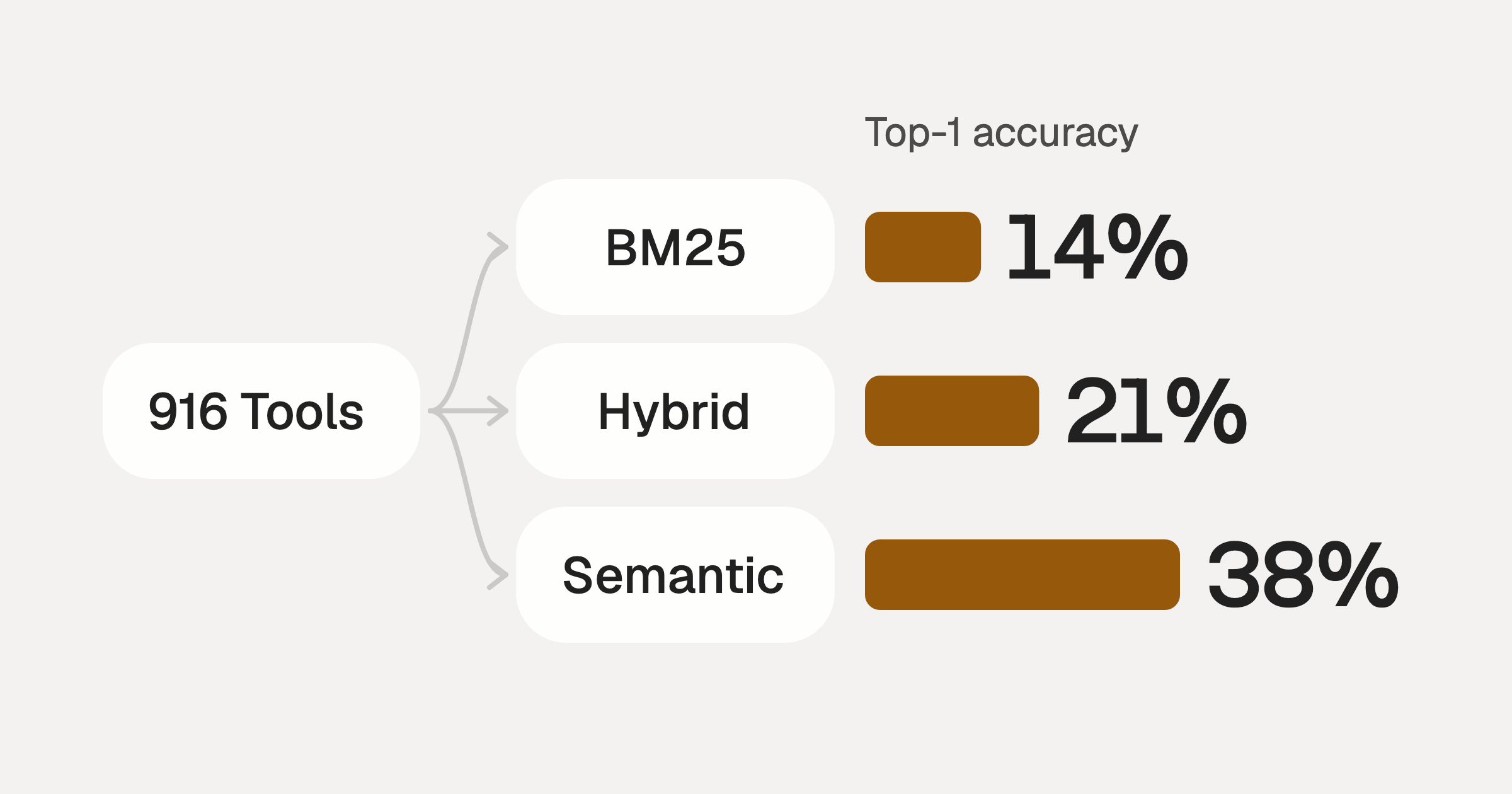
Comparing BM25, TF-IDF, and Hybrid Search for MCP Tool Discovery
Benchmarking BM25, TF-IDF, and hybrid search for MCP tool discovery across 916 tools. The 80/20 TF-IDF/BM25 hybrid hits 21% Top-1 accuracy in under 1ms.
10 min
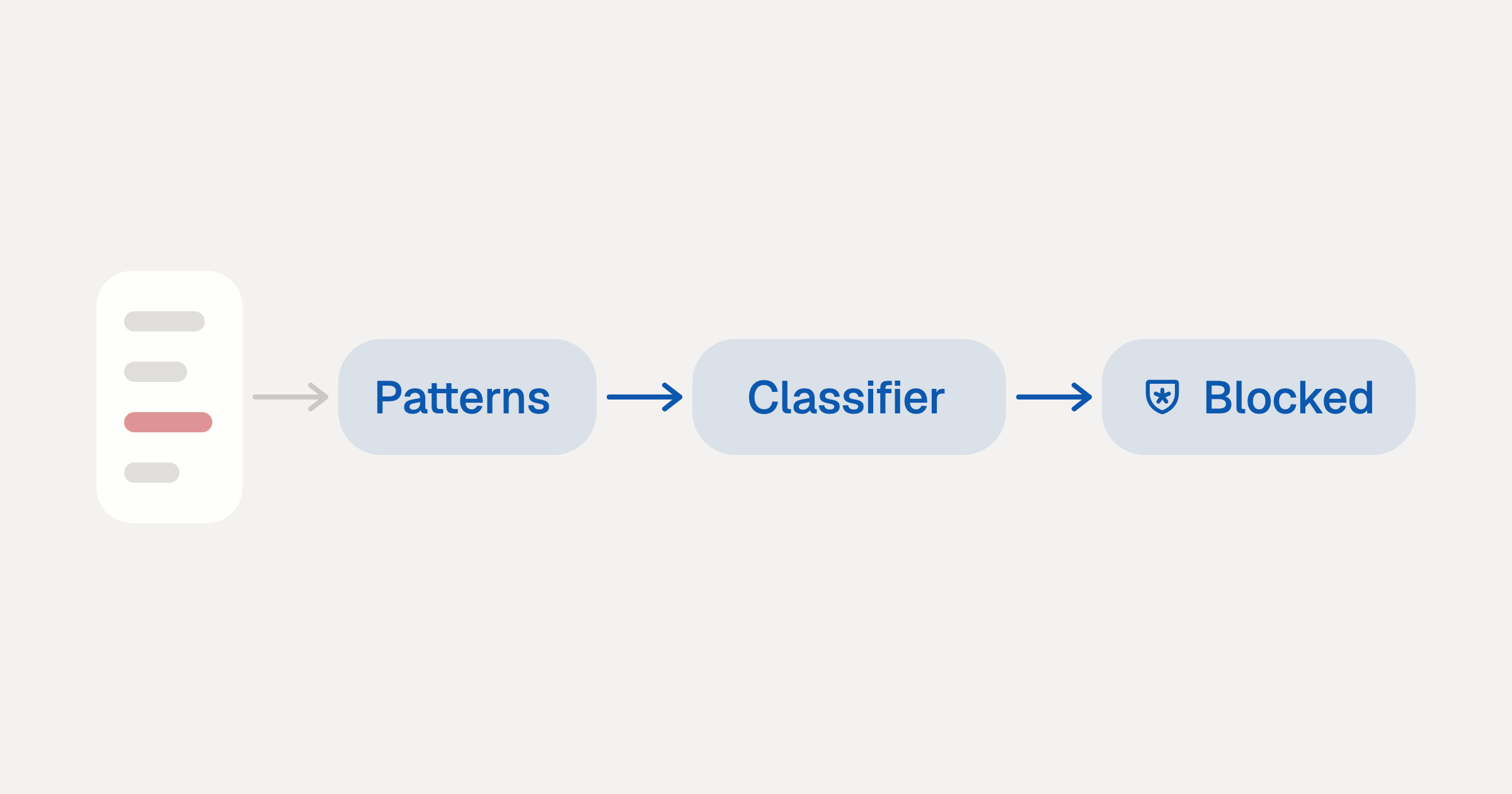
Indirect Prompt Injection Defense for MCP Tools: A Technical Guide
MCP tools that read emails, CRM records, and tickets are indirect prompt injection vectors. Here's how we built a two-tier defense that scans tool results in ~11ms.
12 min
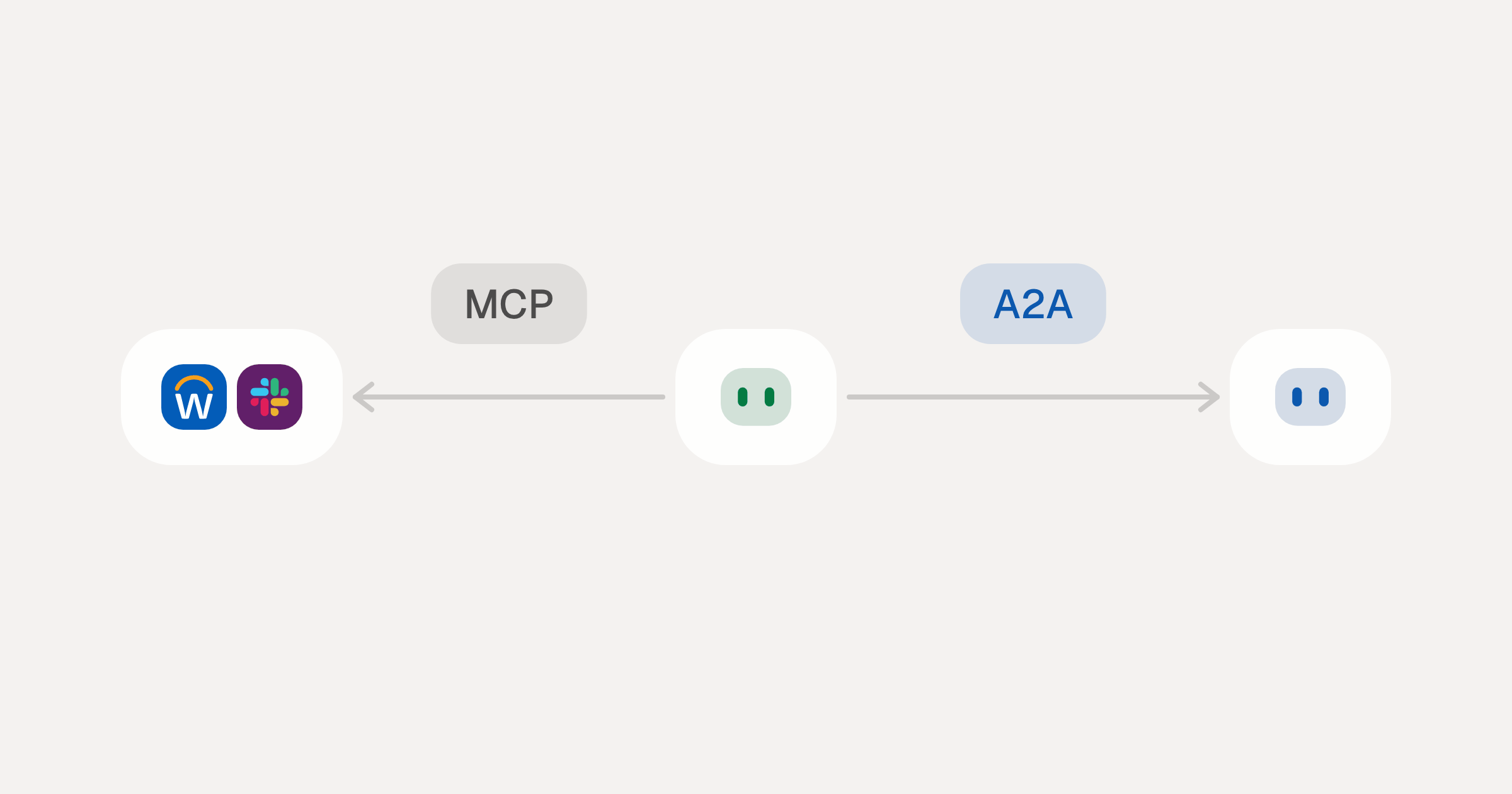
MCP vs A2A: Architecture, Security, and When to Use Each
MCP vs A2A: what each protocol standardizes, how they differ, the security risks they share, and when to use one, both or a hybrid.
12 min
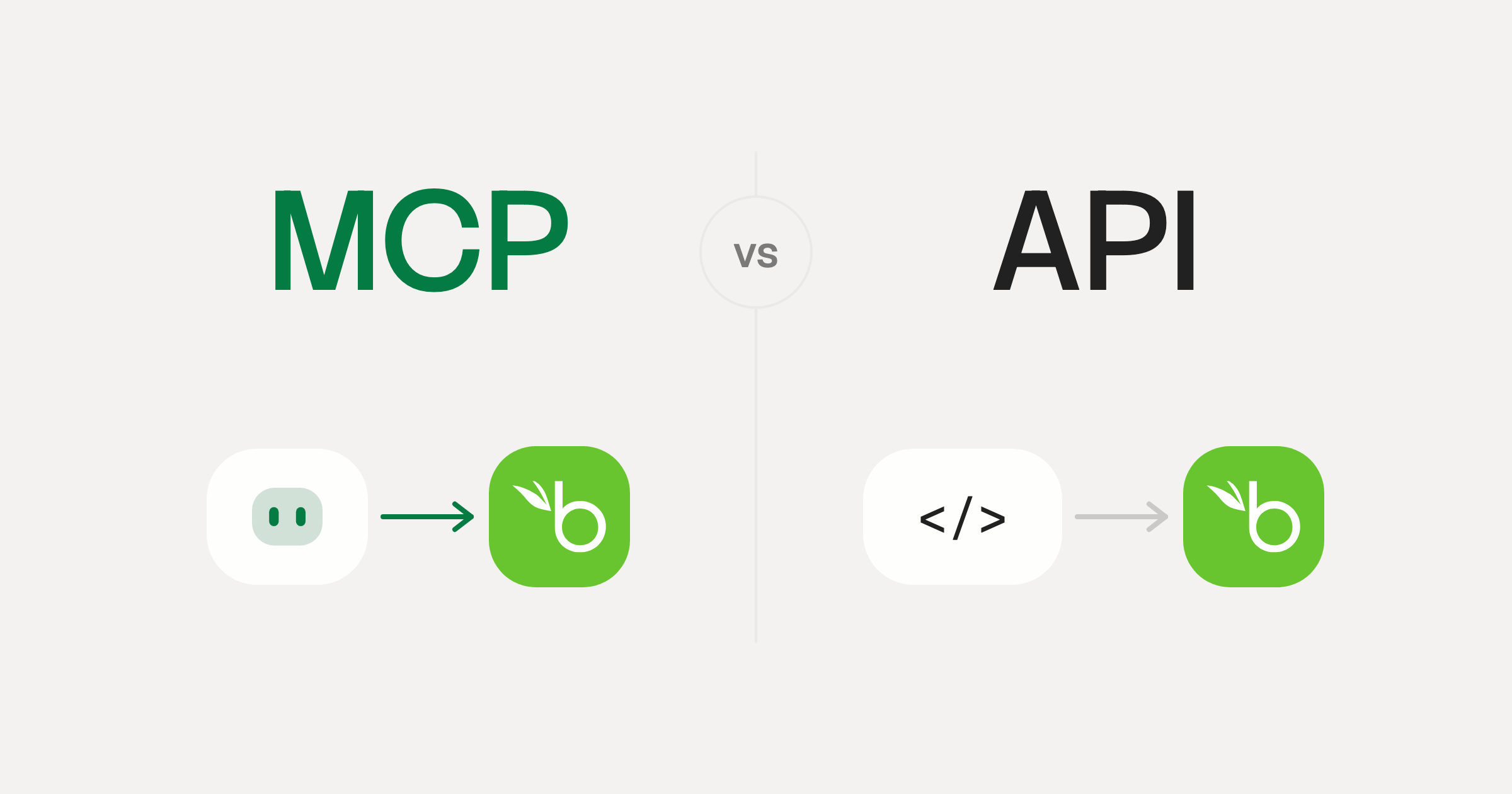
MCP vs API: What Hundreds of Connector Builds Taught Us
MCP wraps APIs, it doesn't replace them. After building hundreds of connectors that serve both, here's when each approach wins.
14 min read
Recruitee MCP Server FAQ
Does StackOne have a Recruitee MCP server?
Recruitee MCP server vs direct API integration: what's the difference?
How does Recruitee authentication work for AI agents?
origin_owner_id.Are Recruitee MCP tools vulnerable to prompt injection?
What is the context bloat of a Recruitee agent and how do I avoid it?
Can I limit which actions my Recruitee agent can access?
Can I create custom agent actions for my Recruitee MCP server?
When should I NOT use a Recruitee MCP server?
What AI frameworks and AI clients does the StackOne Recruitee MCP server support?
Put your AI agents to work
Connect AI to every company system and control what it can do in each one, down to the field.