


Instagram MCP Server
for AI Agents
Connect your AI agent to StackOne's Instagram MCP server and give it 83 MCP tools out of the box. Auth, tool execution, and security all managed.

 StackOne







Coverage
83 Agent Actions
Agents can read, write and delete in Instagram. Extend your agent's capabilities with custom actions.

Authentication
Agent Tool Authentication
Per-user OAuth in one call. Your Instagram MCP server gets session-scoped tokens with zero credentials stored on your infra.
Agent Auth →
Security
Agent Protection
Every Instagram tool response scanned for prompt injection in milliseconds, with 88.7% accuracy, all running on CPU.
Prompt Injection Defense →
Performance
Max Agent Context. Min Cost.
Free up to 96% of your agent's context window to enhance reasoning and reduce cost, on every Instagram call.
Tools Discovery →What is the Instagram MCP Server?
A Instagram MCP server lets AI agents read and write Instagram data through the Model Context Protocol, Anthropic's open standard for connecting LLMs to external tools. StackOne's Instagram MCP server ships with 83 pre-built actions, fully extensible via the Connector Builder, plus managed authentication, prompt injection defense, observability, and agent execution runtime. Connect it from MCP clients like Claude Desktop, Claude Code, Cursor, Goose, and VS Code, or from agent frameworks like OpenAI Agents SDK, LangChain, and Vercel AI SDK.
All Instagram MCP Tools
Every StackOne action for Instagram, ready for your agent. Read, write and delete, scoped to exactly what you need.
Product Appeals
- Create Product Appeal
Appeal the rejection of a product in the connected Instagram Shop catalog.
- Get Product Appeal
Get the review and appeal status of a product in the connected Instagram Shop catalog.
Comments
- Create Comment
Post a top-level comment on an Instagram media object.
- List Comments
List all comments on a specific Instagram media object.
- Get Comment
Get details of a specific comment by its ID.
- Update Comment
Hide or unhide a comment on an Instagram media object.
- Delete Comment
Permanently delete a comment from an Instagram media object.
Comment (Facebook Login)s
- Create Comment (Facebook Login)
Post a top-level comment on an Instagram media object using Facebook Login.
- Get Comment (Facebook Login)
Get details of a specific comment by its ID using Facebook Login.
- Update Comment (Facebook Login)
Hide or unhide a comment on an Instagram media object using Facebook Login.
- Delete Comment (Facebook Login)
Permanently delete a comment from an Instagram media object using Facebook Login.
Hashtags
- Search Hashtag
Find the ID for a specific Instagram hashtag.
- Get Hashtag
Get the name of an Instagram hashtag by its ID.
Medias
- Publish Media
Publish a media container to the Instagram account feed.
- List Media
List all media objects published on the authenticated Instagram account.
- Get Media
Get details of a specific media object by its ID.
- Update Media
Turn comments on or off for an Instagram media object.
Media (Facebook Login)s
- Publish Media (Facebook Login)
Publish a media container to the Instagram Business Account feed using Facebook Login.
- List Media (Facebook Login)
List all media objects published on the Instagram Business Account using Facebook Login.
- Get Media (Facebook Login)
Get details of a specific media object by its ID using Facebook Login.
- Update Media (Facebook Login)
Turn comments on or off for an Instagram media object using Facebook Login.
- Delete Media (Facebook Login)
Delete a media object from the Instagram Business Account using Facebook Login.
Collaborative Media (Facebook Login)s
- List Collaborative Media (Facebook Login)
List posts by other users on which the account is an accepted collaborator using Facebook Login.
- Search Collaborative Media (Facebook Login)
Get a post by another user on which the account is an accepted collaborator using Facebook Login.
Messages
- Send Message
Send a direct message to an Instagram user.
- Get Message
Get the content and sender of a specific direct message.
Conversations
- List Conversations
List all direct message conversations for the authenticated Instagram account.
- Get Conversation
Get messages in a specific direct message conversation.
Ice Breakers
- Create Ice Breakers
Set the ice breaker questions shown when a person starts a conversation with the account.
- List Ice Breakers
Get the ice breaker questions shown when a person starts a conversation with the account.
- Delete Ice Breakers
Remove all ice breaker questions from the account's messaging profile.
Persistent Menus
- Get Persistent Menu
Get the persistent menu shown in the account's direct message conversations.
- Set Persistent Menu
Set the persistent menu shown in the account's direct message conversations.
- Delete Persistent Menu
Remove the persistent menu from the account's direct message conversations.
Other (49)
- Create Or Update Product Tags
Add or update product tags from a connected catalog on an Instagram media object.
- Create Comment Reply
Reply to a top-level comment on an Instagram media object.
- Create Comment Reply (Facebook Login)
Reply to a top-level comment on an Instagram media object using Facebook Login authentication.
- Create Media Container
Create a media container as the first step of the two-step publishing process.
- Create Carousel Item Container
Create a container for a single item within a carousel post.
- Create Carousel Container
Create a carousel container from previously created item containers.
- Create Media Container (Facebook Login)
Create a media container as the first step of publishing via Facebook Login.
- Create Carousel Item Container (Facebook Login)
Create a container for a single carousel item using Facebook Login.
- Create Carousel Container (Facebook Login)
Create a carousel container from item containers using Facebook Login.
- Upload Container Video (Facebook Login)
Upload a hosted video into a resumable media container using Facebook Login.
- Send Private Reply
Send a private direct message to a person who commented on the account's media.
- List Catalogs
List all product catalogs connected to the Instagram Business Account.
- Search Catalog Products
Search for products in a connected Instagram Shopping catalog.
- Get Product Tags
Get all product tags on a specific Instagram media object.
- Get Comment Replies
List the replies to a specific Instagram comment.
- List Comments (Facebook Login)
List all comments on a specific Instagram media object using Facebook Login.
- Get Comment Replies (Facebook Login)
List the replies to a specific Instagram comment using Facebook Login authentication.
- Get Business Discovery
Look up public profile information for another Instagram Business or Creator account.
- List Hashtag Recent Media
Get the most recent public media posts for a specific hashtag.
- List Hashtag Top Media
Get the top-performing public media posts for a specific hashtag.
- List Recently Searched Hashtags
List the hashtags the account has searched in the last 7 days.
- Get Unified Credentials
Get the current Instagram connection's unified credentials and identity.
- Get Account Insights
Get analytics and performance insights for the authenticated Instagram account.
- Get Media Insights
Get engagement analytics for a specific Instagram media object.
- Get Account Insights (Facebook Login)
Get analytics and performance insights for the Instagram Business Account using Facebook Login.
- Get Media Insights (Facebook Login)
Get engagement analytics for a specific Instagram media object using Facebook Login.
- Get Container Status
Check the processing status of a media container before publishing.
- Get Container Status (Facebook Login)
Check the processing status of a media container using Facebook Login.
- Get Content Publishing Limit
Get how many posts the account has published against its 24-hour publishing limit.
- Get Content Publishing Limit (Facebook Login)
Get how many posts the account has published against its 24-hour publishing limit using Facebook Login.
- Get Media Children
List the individual images and videos inside a carousel media object.
- Get Media Children (Facebook Login)
List the individual images and videos inside a carousel media object using Facebook Login.
- List Media Collaborators (Facebook Login)
List the collaborators invited to an Instagram media object and their invitation status using Facebook Login.
- List Live Media (Facebook Login)
List live videos the Instagram Business Account is broadcasting right now using Facebook Login.
- List Tagged Media
List media objects where the authenticated Instagram account has been tagged.
- List Tagged Media (Facebook Login)
List media objects where the Instagram Business Account has been tagged, using Facebook Login.
- Get Mentioned Media (Facebook Login)
Get data about a specific media object where the Instagram Business Account was @mentioned, using Facebook Login.
- Get Mentioned Comment (Facebook Login)
Get a comment in which another user @mentioned the account using Facebook Login.
- Get Profile
Get the authenticated Instagram account's profile information.
- Get Profile (Facebook Login)
Get the Instagram Business Account profile information using Facebook Login.
- List Stories
List active stories on the authenticated Instagram account.
- Get Story
Get details of a specific story by its ID.
- List Stories (Facebook Login)
List active stories on the Instagram Business Account using Facebook Login.
- Get Story (Facebook Login)
Get details of a specific story by its ID using Facebook Login.
- Fetch Collaboration Invites (Facebook Login)
List pending invitations for the account to collaborate on other users' posts using Facebook Login.
- Respond To Collaboration Invite (Facebook Login)
Accept or decline a pending collaboration invite using Facebook Login.
- Reply To Mention (Facebook Login)
Comment on a post or comment in which another user @mentioned the account using Facebook Login.
- Reply To Mention
Comment on a post or comment in which another user @mentioned the account.
- Display Sender Action
Show a typing indicator or mark messages as seen in a direct message conversation.
Instagram AI Agent Use Cases
Connect your AI agent to Instagram and help your team scale the marketing operations they run by hand today.
Use StackOne to connect your AI agent to your marketing automation, CRM, and email tools to automate lead nurture email sequences.
ViewUse StackOne to connect your AI agent to your marketing automation, email, and analytics platforms to automate campaign performance reporting.
ViewUse StackOne to connect your AI agent to your document stores, email platforms, and messaging tools to automate content repurposing and distribution.
ViewSet Up Your Instagram MCP Server in Minutes
One endpoint. Any framework. Your agent is talking to Instagram in under 10 lines of code.
Agent Frameworks


 JSON
{
  "mcpServers": {
    "stackone": {
      "command": "npx",
      "args": [
        "-y",
        "mcp-remote@latest",
        "https://api.stackone.com/mcp?x-account-id=<account_id>",
        "--header",
        "Authorization: Basic <YOUR_BASE64_TOKEN>"
      ]
    }
  }
}Platform Resources
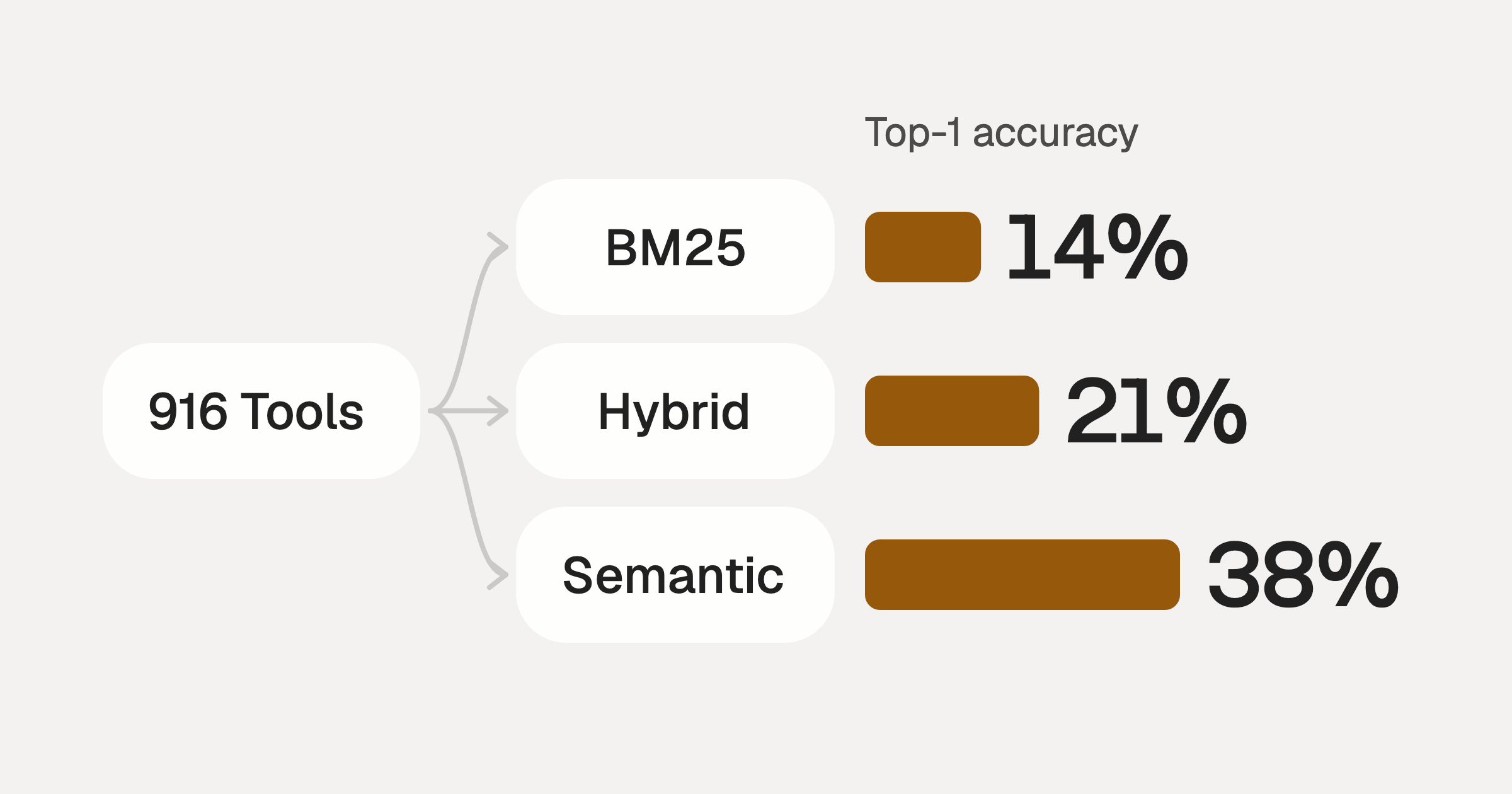
Comparing BM25, TF-IDF, and Hybrid Search for MCP Tool Discovery
Benchmarking BM25, TF-IDF, and hybrid search for MCP tool discovery across 916 tools. The 80/20 TF-IDF/BM25 hybrid hits 21% Top-1 accuracy in under 1ms.
10 min
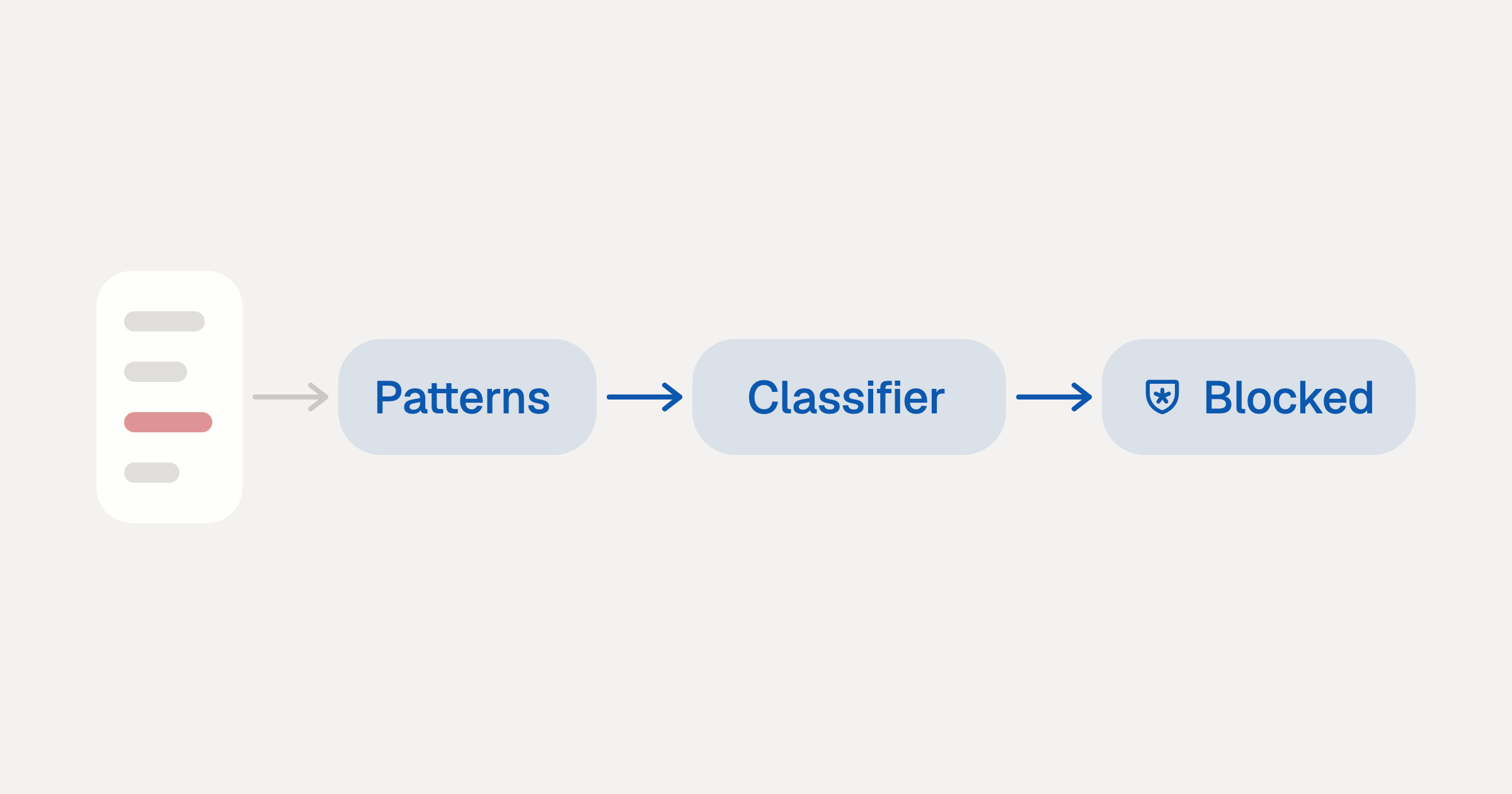
Indirect Prompt Injection Defense for MCP Tools: A Technical Guide
MCP tools that read emails, CRM records, and tickets are indirect prompt injection vectors. Here's how we built a two-tier defense that scans tool results in ~11ms.
12 min
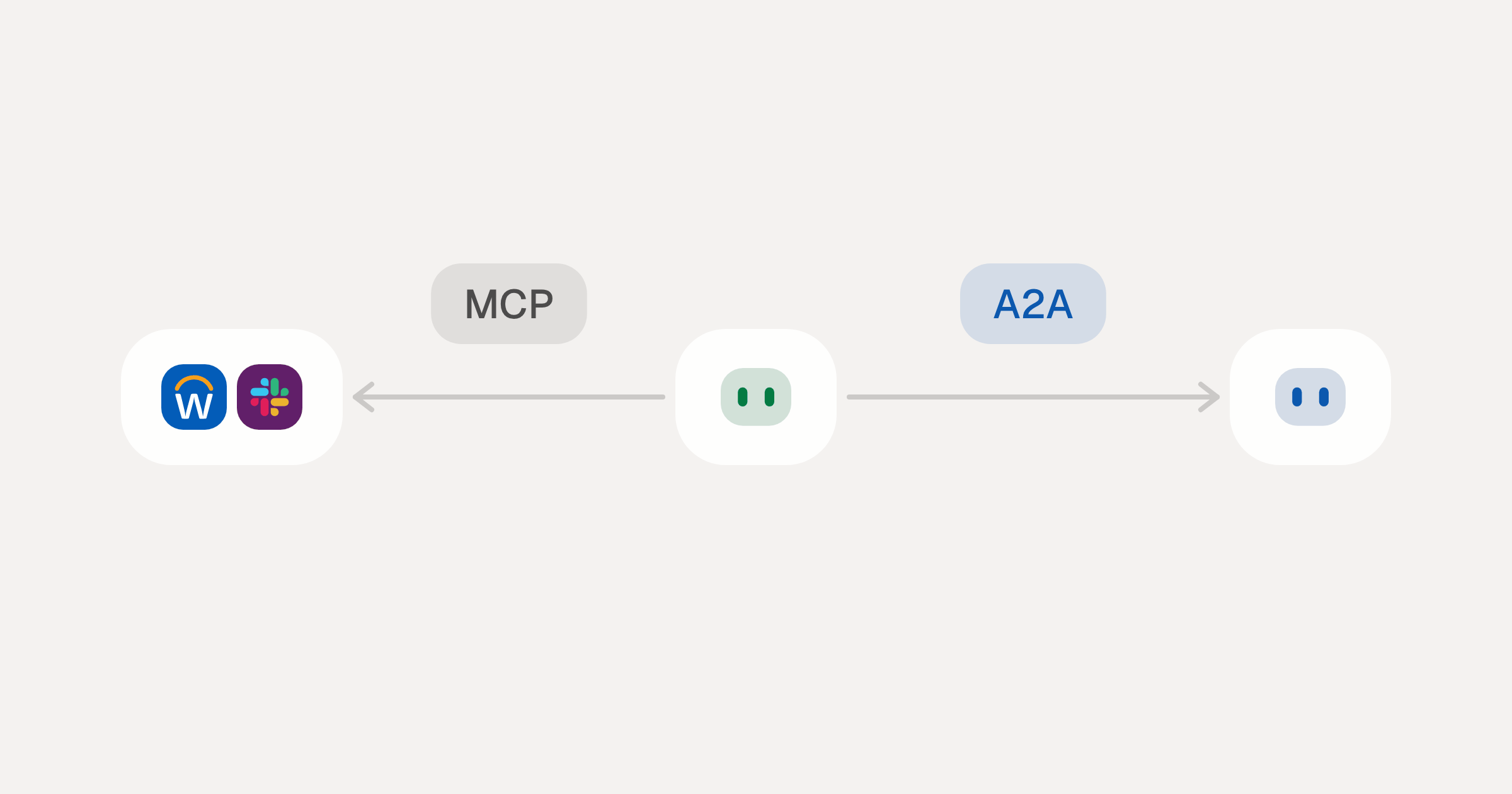
MCP vs A2A: Architecture, Security, and When to Use Each
MCP vs A2A: what each protocol standardizes, how they differ, the security risks they share, and when to use one, both or a hybrid.
12 min
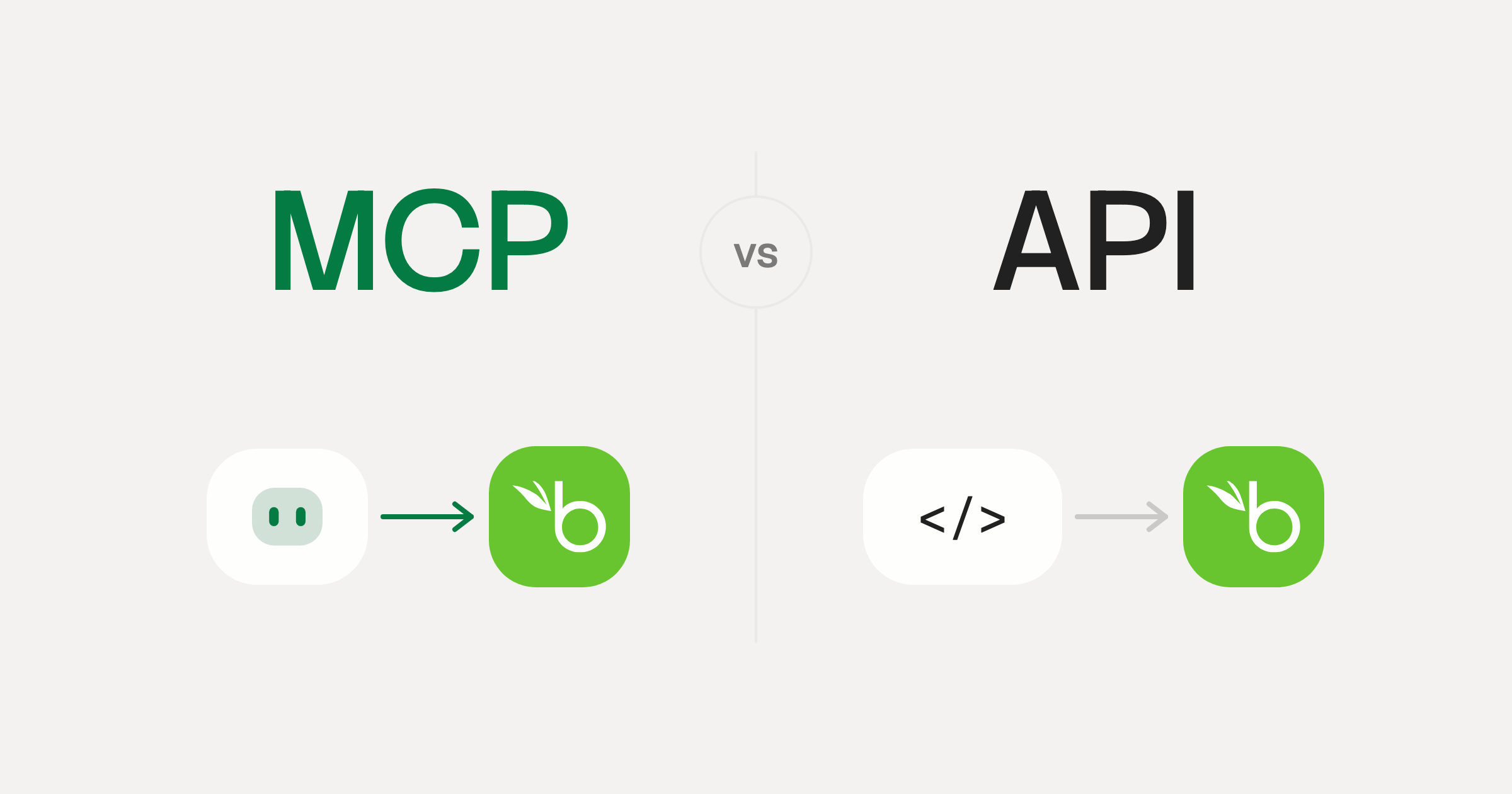
MCP vs API: What Hundreds of Connector Builds Taught Us
MCP wraps APIs, it doesn't replace them. After building hundreds of connectors that serve both, here's when each approach wins.
14 min read
Instagram MCP Server FAQ
Does StackOne have a Instagram MCP server?
Instagram MCP server vs direct API integration: what's the difference?
How does Instagram authentication work for AI agents?
origin_owner_id.Are Instagram MCP tools vulnerable to prompt injection?
What is the context bloat of a Instagram agent and how do I avoid it?
Can I limit which actions my Instagram agent can access?
Can I create custom agent actions for my Instagram MCP server?
When should I NOT use a Instagram MCP server?
What AI frameworks and AI clients does the StackOne Instagram MCP server support?
Put your AI agents to work
Connect AI to every company system and control what it can do in each one, down to the field.