


Affinity MCP Server
for AI Agents
Connect your AI agent to StackOne's Affinity MCP server and give it 140 MCP tools out of the box. Auth, tool execution, and security all managed.
 StackOne







Coverage
140 Agent Actions
Agents can read, write, delete and run operations in Affinity. Extend your agent's capabilities with custom actions.

Authentication
Agent Tool Authentication
Per-user OAuth in one call. Your Affinity MCP server gets session-scoped tokens with zero credentials stored on your infra.
Agent Auth →
Security
Agent Protection
Every Affinity tool response scanned for prompt injection in milliseconds, with 88.7% accuracy, all running on CPU.
Prompt Injection Defense →
Performance
Max Agent Context. Min Cost.
Free up to 96% of your agent's context window to enhance reasoning and reduce cost, on every Affinity call.
Tools Discovery →What is the Affinity MCP Server?
A Affinity MCP server lets AI agents read and write Affinity data through the Model Context Protocol, Anthropic's open standard for connecting LLMs to external tools. StackOne's Affinity MCP server ships with 140 pre-built actions, fully extensible via the Connector Builder, plus managed authentication, prompt injection defense, observability, and agent execution runtime. Connect it from MCP clients like Claude Desktop, Claude Code, Cursor, Goose, and VS Code, or from agent frameworks like OpenAI Agents SDK, LangChain, and Vercel AI SDK.
All Affinity MCP Tools
Every StackOne action for Affinity, ready for your agent. Read, write, delete and run operations, scoped to exactly what you need.
A Single Field Value On A Companys
- Get A Single Field Value On A Company
Fetch one field value on a company
- Update A Single Field Value On A Company
Set or clear a single field value on a company
A Field Values
- Update A Field Value
Update the value of an existing field value
- Delete A Field Value
Delete a field value by ID
Fields
- Create Field
Create a new field (custom column) on a list or globally
- List Fields
Retrieve field metadata definitions available in Affinity
Files
- Upload Files
Upload a file and attach it to a person, organization or opportunity
- Download File
Download the binary content of an entity file by ID
Unified Organizations
- List Unified Organizations
List unified organizations in Affinity.
- Get Unified Organization
Get a unified Affinity organization by ID.
Unified Roles
- List Unified Roles
List unified roles in Affinity, derived from account roles observed on API v2 users.
- Get Unified Role
Get a unified Affinity role by ID.
Unified Users
- List Unified Users
List unified users in Affinity, scoped to internal team members.
- Get Unified User
Get a unified Affinity user by ID.
An Interactions
- Update An Interaction
Update content/date/persons of a manually logged interaction
- Delete An Interaction
Delete an interaction by id and type
A Dropdown Option For A List Fields
- Create A Dropdown Option For A List Field
Create a new dropdown option on a dropdown, ranked-dropdown or status-dropdown list field
- Get A Dropdown Option For A List Field
Fetch one dropdown option of a list field by ID
- Update A Dropdown Option For A List Field
Update text, rank, color, statusCategory or winRate of an existing dropdown option
- Delete A Dropdown Option For A List Field
Permanently delete a dropdown option from a list field
A Single Notes
- Get A Single Note
Fetch one note by ID, including content, creator, mentions and timestamps
- Update A Single Note
Update a note's HTML content and/or replace its person/company/opportunity associations
- Delete A Single Note
Permanently delete a note you created
An Opportunitys
- Update An Opportunity
Partially update an opportunity (currently only its name)
- Delete An Opportunity
Delete an opportunity by ID
An Organizations
- Update An Organization
Update an organization's name, domain or associated persons
- Delete An Organization
Delete an organization
A Persons
- Create A Person
Create a new Person
- Update A Person
Update a person (v1 API) - only supplied attributes change
- Delete A Person
Delete a Person by ID
A Reminders
- Create A Reminder
Create a one-time or recurring reminder tied to one company, person, or opportunity
- Update A Reminder
Partially update a reminder (content, dueDate, owner, completion, recurrence)
- Delete A Reminder
Delete a reminder by ID
A Single Transcripts
- Get A Single Transcript
Fetch one transcript with its first 100 fragments
- Delete A Single Transcript
Delete a transcript (BETA)
Other (105)
- Create A New Field Value
Create a field value on a person, organization or opportunity
- Create A New Interaction
Create a manually logged meeting, call or chat message
- Add A List Entry To A List
Add an existing Company or Person to a List as a new List Entry (BETA)
- Create A List
Create a new List of companies, persons, or opportunities
- Create A Note
Create a note attached to persons/companies/opportunities, anchored to a meeting/call/chat message, or as a reply to a root note
- Create A New Opportunity
Create a new opportunity on an opportunity-type list
- Create A New Organization
Create a new organization (company) in Affinity
- Send Feedback
Send feedback to Affinity about a product area or feature
- Get Field Values On A Single Company
List field values on one company
- Get Metadata On Company Fields
List non-list-specific company field metadata
- Get Values For A Single Field On A Company
List all values of one field on one company, paginated
- Get Dropdown Options For A Company Field
List dropdown options for a company dropdown or ranked-dropdown field
- Get All Field Value Changes
List field value changes across all entities and fields (delta-sync feed, ascending changedAt)
- Get Field Values
List all field values for one person, organization, opportunity or list entry
- Get All Files
List file metadata (id, name, size, type, creator, timestamps) for files visible to the caller, newest first
- Search Files By Keyword
Keyword search over file contents, returning one best-matching excerpt per file
- Get A Single File
Get one file's metadata plus a temporary signed downloadUrl
- Get Unified Credentials
Get the current Affinity connection's unified credentials and identity.
- List Unified Resource Types
List unified resource types in Affinity.
- List Unified Resource Users
List unified resource users in Affinity.
- Get Metadata On All Calls
List call interactions with participants
- Get Metadata On All Chat Messages
List chat message interactions with participants
- Get Metadata On All Emails
List email interaction metadata (subject, participants, timestamps)
- Get Metadata On All Meetings
List meeting interactions (past and future) with attendees
- List Interactions
Retrieve interactions (emails, meetings, etc.) associated with a person, organization, or opportunity
- Get A Single Meeting
Get one meeting by ID
- Get A Specific Interaction
Get one v1 interaction by id and type
- Get All List Entries On A List
Page through all List Entries (rows) on a List, optionally with field data
- Search List Entries
Search list entries with filters, sorts and a keyword
- Get Field Value Changes On A List Entry
Page through the change history of field values on a List Entry (oldest first)
- Get Field Values On A Single List Entry
List field values on a single List Entry
- Get A Single List Entry On A List
Fetch one List Entry by id with optional field data
- Get A Single Field Value
Get one field value on a List Entry
- Get Metadata On All Lists
Page through all Lists the caller can view
- Get Metadata On A Single List's Fields
List metadata for all fields on one list
- Get Dropdown Options For A List Field
List dropdown options for a dropdown-type list field
- Get Values For A Single Field On A List Entry
Page through all values of one field on a list entry
- Get Metadata On Saved Views
Page through all Saved Views of a List
- Get All List Entries On A Saved View
Page through the rows of a sheet-type Saved View, returning only the columns and filters configured on that view
- Get Metadata On A Single List
Fetch metadata for a single List by ID
- Get Metadata On A Single Saved View
Fetch one Saved View (id, name, type sheet/board/dashboard, createdAt)
- Get All Company Merges
List company merges for the organization, newest first
- Get All Person Merges
List person merges with status, filterable by status or taskId
- Get All Company Merge Tasks
List company merge tasks (batch merge operations) with status and per-task result counts
- Get All Person Merge Tasks
List person merge tasks (batch merge operations) with status and per-task result counts
- Get All Company Duplicate Suggestions
List company duplicate merge suggestions (BETA)
- Get All Person Duplicate Suggestions
List person duplicate merge suggestions (BETA)
- Get Company Merge
Get status and details of one company merge by mergeId
- Get Person Merge
Get status and details (persons involved, timestamps, error info) of one person merge
- Get Company Merge Task
Get status and result counts of one company merge task
- Get Person Merge Task
Get status and result counts of one person merge task
- Get All Notes
List all root notes (replies excluded) with optional filtering and cursor pagination
- Search Notes By Keyword
Keyword-search notes, returning one note (id, kind) plus a matching preview passage per result, ordered by relevance
- Get Companies Attached To A Note
List the companies directly attached to a Note
- Get Opportunities Attached To A Note
List the opportunities directly attached to a Note
- Get Persons Attached To A Note
List the persons directly attached to a Note
- Get Replies For A Note
List reply notes of a given Note, optionally filtered
- Get All Opportunities
List opportunities with cursor pagination
- Get Notes For An Opportunity
List notes for one opportunity, including notes attached directly and those attached to persons on it, with filtering and cursor pagination
- Get A Single Opportunity
Fetch a single opportunity by ID
- Get All Companies
List companies with cursor pagination
- Search Companies
Search companies with filters, sorts and a keyword term, returning cursor-paginated Company records
- Get A Company's List Entries
List the list entries (rows) of one company across all lists, with list-specific field data and creation metadata
- Get A Company's Lists
List all lists the given company appears in (basic list info only) that the caller can view
- Get Notes For A Company
List notes for a company, including notes attached directly and notes attached to persons on the company
- Get Relationships For A Company
List person-to-person relationships related to a company with interaction scores (0.0-1.0) and LinkedIn connection dates
- Get A Single Company
Fetch a single company by ID with optional field data
- Get Field Values On A Single Person
Paginate field values on one Person (enriched, global, relationship-intelligence by default)
- Get Metadata On Person Fields
List metadata for non-list-specific Person fields (IDs, names, types)
- Get Values For A Single Field On A Person
Paginate all values of a single field on one Person (multi-value fields return many)
- Get Dropdown Options For A Person Field
List dropdown options for a Person dropdown or ranked-dropdown field
- Get A Single Field On A Person
Fetch one non-list field and its value on a Person
- Get All Persons
List all Persons with cursor pagination, optionally filtered by IDs and with field data attached
- Search Persons
Search Persons with nested filters, sorts and a keyword
- Get A Person's List Entries
List a Person's List Entries across all Lists with list-specific field data
- Get A Person's Lists
List the Lists that contain a given Person
- Get Notes For A Person
List notes related to a Person (attached, from attended meetings, or mentioning them), with optional filtering
- Get Relationships For A Person
List a Person's relationships with interaction scores (0.0-1.0) and LinkedIn connection dates
- Get A Single Person
Fetch a single Person by ID, optionally with field data
- List Introduction Paths
List ranked introduction paths (BETA) from internal people to a target person or any person at a target company
- Get Coworker Inferred Connections
List inferred coworker connections (source in your data may know a target via overlapping employment at a shared company), grouped by target
- Get Investor-Executive Inferred Connections
List inferred investor-executive connections (source invested in a company where the target was an executive), grouped by target
- Get Relationship Strengths
Get relationship strengths between internal people and a given external person
- Get All Reminders
List reminders visible to the caller with filter and cursor pagination
- Get A Single Reminder
Fetch one reminder by ID
- Get Metadata On All Teams
List all Teams visible to the caller
- Get All Lists A Team Has Access To
List all Lists a Team can access (id, name, creatorId, ownerId, isPublic, type, createdAt)
- Get All Members Of A Team
List all members of a Team (membership id, user, addedAt, optional privacyType)
- Get Metadata On A Single Team
Get one Team by id
- Get All Transcripts
List transcripts (metadata only) visible to the caller
- Get Fragments Of A Transcript
List all fragments of one transcript, paginated
- Get All Users
List internal users in the Affinity organization
- Get A Single User
Fetch a single internal user by ID
- Get Current User
Return the authenticated user, tenant, and grant (type and scopes) for the current credential
- Get Rate Limit Usage
Get current rate limit usage (per-minute and, if applicable, monthly) for the authenticated caller
- Update A Single Field Value On A List Entry
Set or clear a single field value on a List Entry
- Update A Single Field Value On A Person
Set or clear one non-list field value on a Person
- Delete A Field
Delete a field by ID
- Delete A Specific List Entry
Delete a List Entry from a List (v1 API)
- Perform Batch Operations On A Company's Fields
Update up to 100 field values on a company in one request
- Perform Batch Operations On A List Entry's Fields
Update up to 100 field values on a List Entry in one request
- Initiate Company Merge
Start an asynchronous merge of a duplicate company into a primary company
- Initiate Person Merge
Start an asynchronous merge of a duplicate person into a primary person
- Perform Batch Operations On A Person's Fields
Update up to 100 person field values in one request via the update-fields operation
- Semantic Search
Natural-language semantic search over companies, returning matches with relevance scores
Affinity AI Agent Use Cases
Connect your AI agent to Affinity and help your team scale the sales operations they run by hand today.
Use StackOne to connect your AI agent to your CRM, email, and calendar tools to automate post-demo follow-up.
ViewUse StackOne to connect your AI agent to your CRM, email, and calendar tools to automate deal risk scoring and pipeline alerts.
ViewUse StackOne to connect your AI agent to your CRM, sales engagement, and messaging tools to automate outbound prospecting.
ViewSet Up Your Affinity MCP Server in Minutes
One endpoint. Any framework. Your agent is talking to Affinity in under 10 lines of code.
Agent Frameworks


 JSON
{
  "mcpServers": {
    "stackone": {
      "command": "npx",
      "args": [
        "-y",
        "mcp-remote@latest",
        "https://api.stackone.com/mcp?x-account-id=<account_id>",
        "--header",
        "Authorization: Basic <YOUR_BASE64_TOKEN>"
      ]
    }
  }
}
Check More CRM MCP Servers
380+ actions
158+ actions
136+ actions
132+ actions
125+ actions
99+ actions
95+ actions
Platform Resources
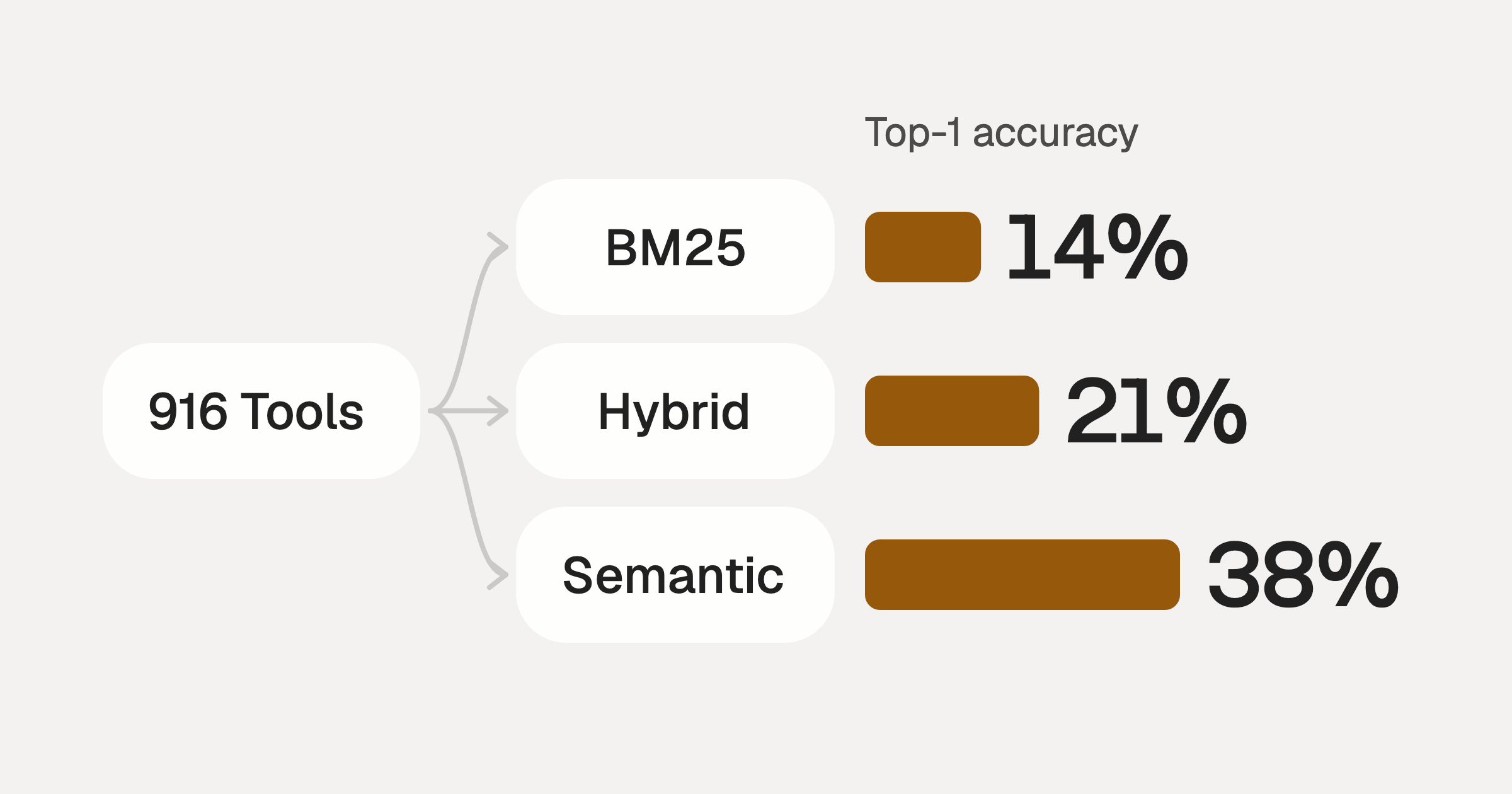
Comparing BM25, TF-IDF, and Hybrid Search for MCP Tool Discovery
Benchmarking BM25, TF-IDF, and hybrid search for MCP tool discovery across 916 tools. The 80/20 TF-IDF/BM25 hybrid hits 21% Top-1 accuracy in under 1ms.
10 min
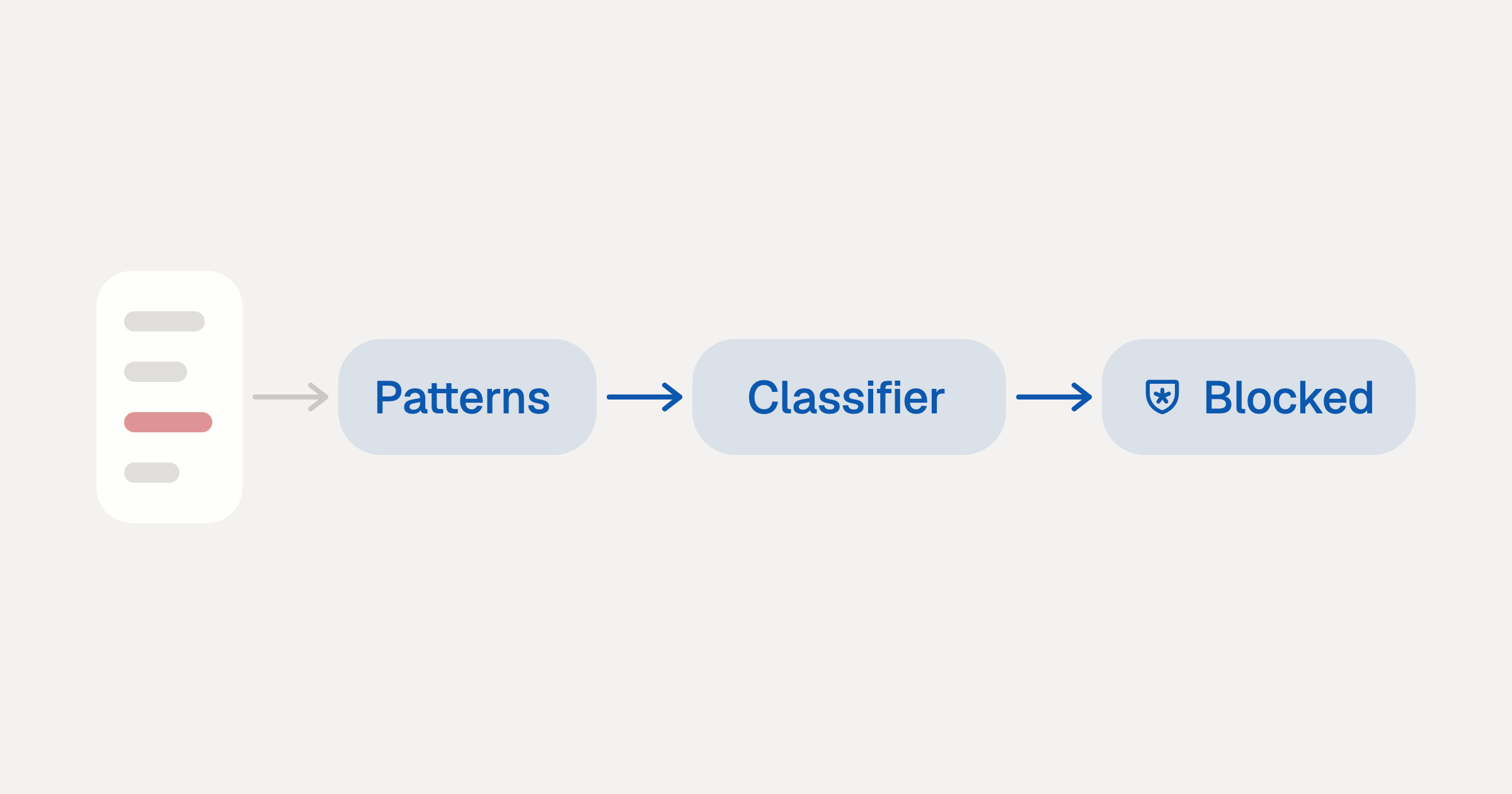
Indirect Prompt Injection Defense for MCP Tools: A Technical Guide
MCP tools that read emails, CRM records, and tickets are indirect prompt injection vectors. Here's how we built a two-tier defense that scans tool results in ~11ms.
12 min
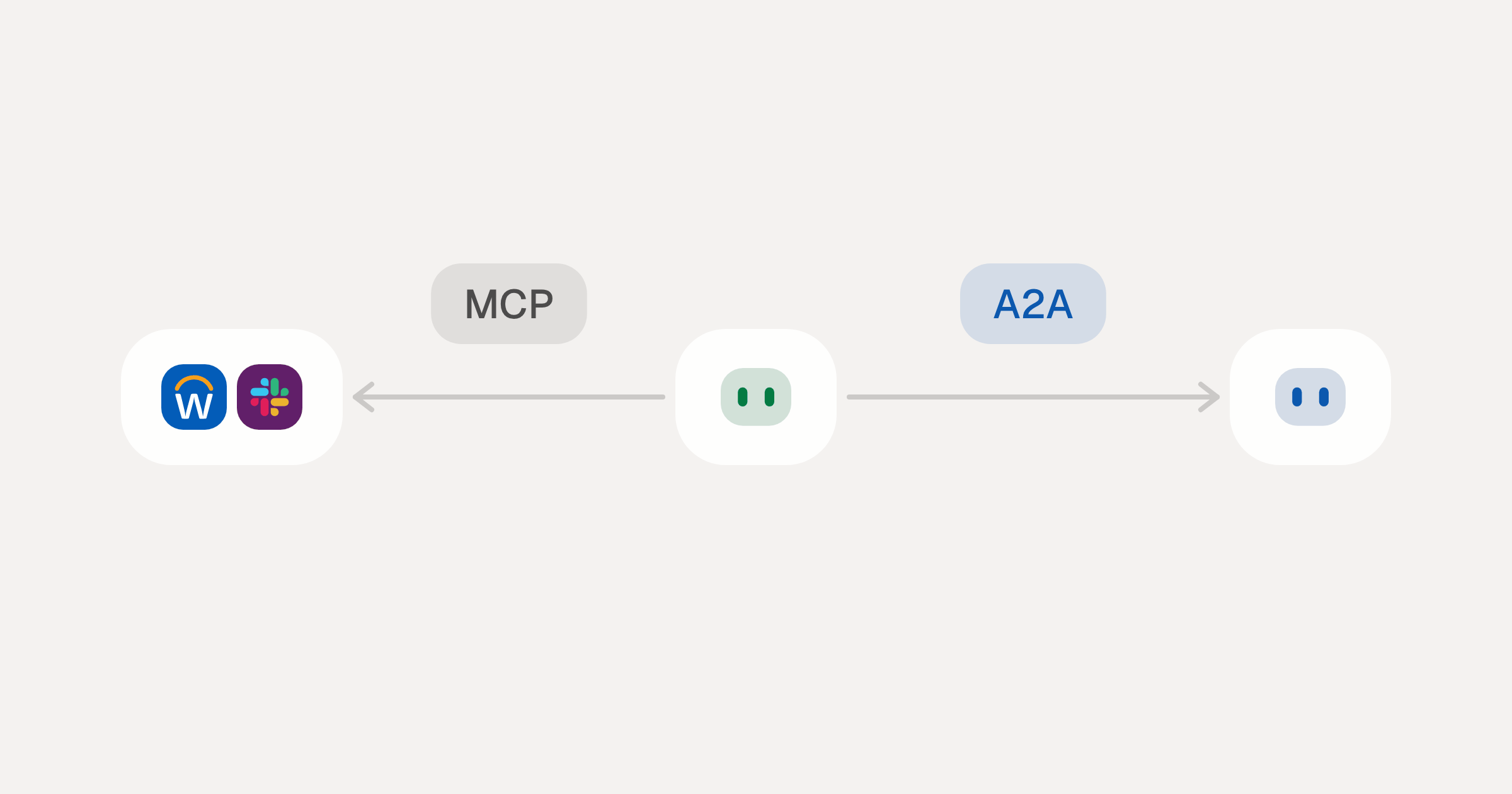
MCP vs A2A: Architecture, Security, and When to Use Each
MCP vs A2A: what each protocol standardizes, how they differ, the security risks they share, and when to use one, both or a hybrid.
12 min
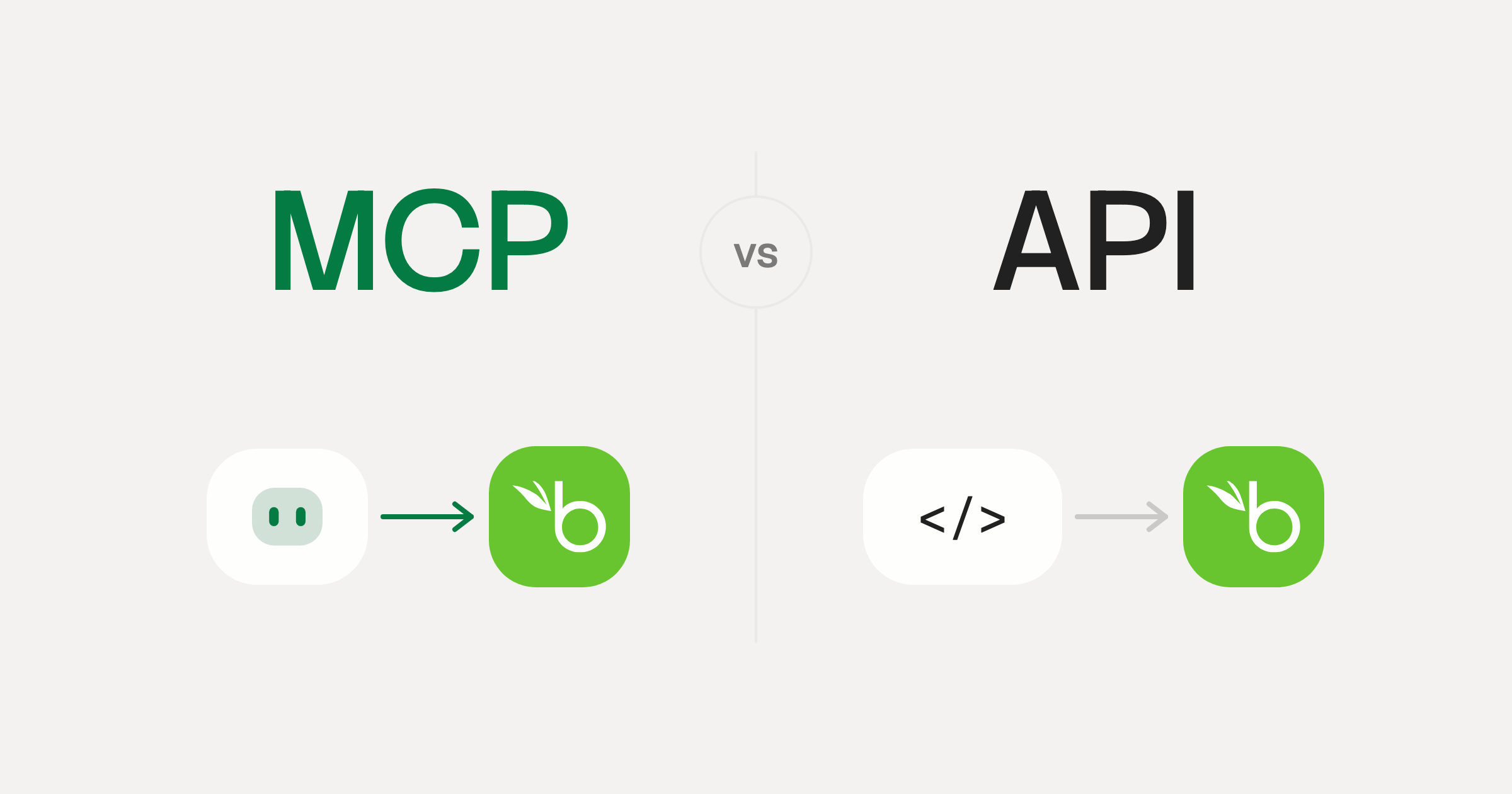
MCP vs API: What Hundreds of Connector Builds Taught Us
MCP wraps APIs, it doesn't replace them. After building hundreds of connectors that serve both, here's when each approach wins.
14 min read
Affinity MCP Server FAQ
Does StackOne have a Affinity MCP server?
Affinity MCP server vs direct API integration: what's the difference?
How does Affinity authentication work for AI agents?
origin_owner_id.Are Affinity MCP tools vulnerable to prompt injection?
What is the context bloat of a Affinity agent and how do I avoid it?
Can I limit which actions my Affinity agent can access?
Can I create custom agent actions for my Affinity MCP server?
When should I NOT use a Affinity MCP server?
What AI frameworks and AI clients does the StackOne Affinity MCP server support?
Put your AI agents to work
Connect AI to every company system and control what it can do in each one, down to the field.